Australian Invoice Template
This free Australian invoice template has every field a business in Australia needs: your ABN, a 10% GST line, AUD totals and BSB or PayID payment details. Download it for Word or Excel, with or without GST, or fill it in online below and save a PDF.
Download the Australian invoice template
Free, no signup. Use the GST version once you're registered for GST; until then, use the no-GST invoice. Prefer a PDF with the maths done for you? Fill it in online.
Australian invoice template example
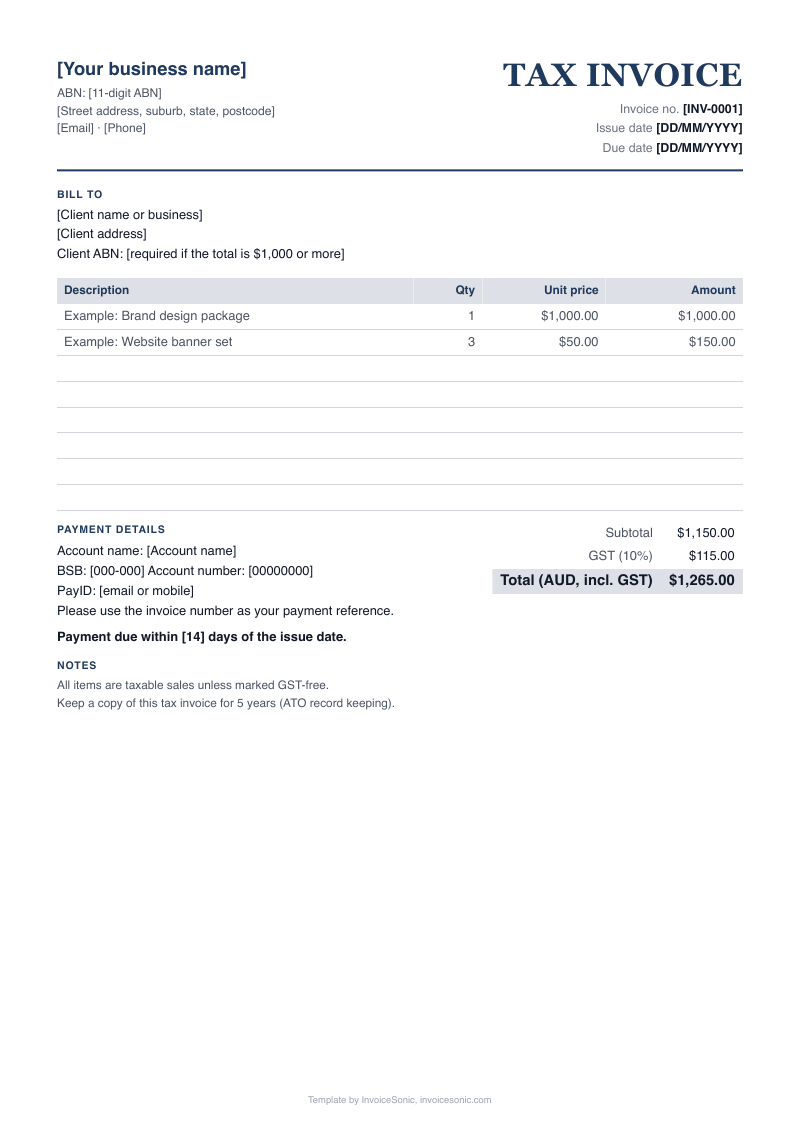
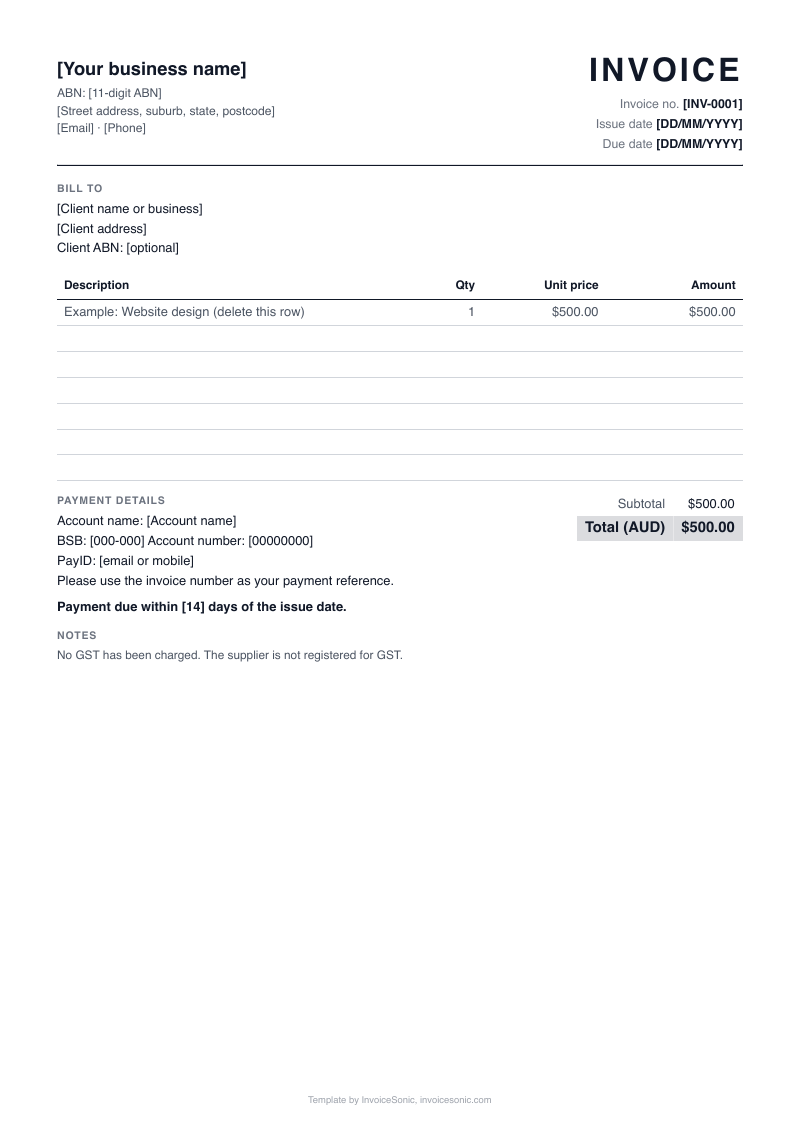
Fill in the template online
Create your invoice online
Last reviewed 22 October 2026 by the InvoiceSonic team.
What to include on an Australian invoice
- Business information at the top: your business name, ABN, phone number and email address
- A unique invoice number and the date of issue
- The client's name and address, plus their ABN when a taxable sale is $1,000 or more
- A description of each job or product with quantity, unit price and line total
- A 10% GST line if you are registered for GST, or no GST line if you are not
- The total payable in AUD, the due date and your payment methods (BSB and account number, PayID, or a card link)
Invoice or tax invoice: which template to use
Use the no-GST invoice while you are not registered for GST. Title it "Invoice", quote your ABN and don't add GST. Registration becomes compulsory when your GST turnover reaches $75,000 ($150,000 for non-profits), and below that an invoice with no GST is correct.
Once you are registered, switch to the tax invoice. It is titled "Tax invoice", shows the GST amount (or states that the total includes GST), and for taxable sales of $1,000 or more it also shows the buyer's identity or ABN. Read more in what is a tax invoice and how to add GST to an invoice.
Word, Excel or the online template?
- Word is the easiest to restyle with your logo, but you type every total and the GST yourself.
- Excel works out each line total, the subtotal, 10% GST and the amount due as you type quantities and prices.
- The online template above does the maths, puts the ABN and GST in the right places and saves a PDF. With a free InvoiceSonic account you can also send it, see when it is opened and let automatic reminders chase late payment.
Whichever you use, save each invoice as a PDF before you send it. Clients can't edit a PDF, and it is the copy you keep for your records.
Who uses this template
- Sole traders and freelancers billing hourly or per project
- Tradies: plumbing, electrical, carpentry, painting and building work
- Consultants, accountants and legal professionals
- Cleaning, gardening, removals and home maintenance
- Creative and digital work: design, writing, photography and web development
- Retail and wholesale goods sold to other Australian businesses
Payment terms that get you paid
Pick terms you will actually enforce and print the due date on the invoice. Many sole traders use 7 or 14 days; larger business clients often set 30 days in their supplier terms. Commonwealth agencies have a published policy of paying correctly rendered invoices within 20 calendar days on contracts up to $1 million, so a complete, accurate invoice matters when you bill government.
Invoicing tips for Australian businesses
- Quote your ABN on every invoice. If you do not, a business that pays you may have to withhold 47% for the ATO unless an exception applies.
- Title the document "Invoice" if you are not registered for GST, and use the GST wording only once you are registered. They are different documents.
- Put the BSB, account name and account number (or your PayID) on the invoice itself, not just in the email. Accounts teams pay from the document. New to PayID? See how to set up PayID.
- Keep a copy of each invoice for five years. The ATO record-keeping rules apply whether you use a Word file, a PDF or an app.
Common mistakes to avoid
- Leaving off the ABN, which can trigger 47% withholding by the payer
- Charging GST before you are registered for GST
- Reusing or skipping invoice numbers, which makes your records hard to reconcile
- Sending an invoice with no due date, so the client has no deadline to pay against
- Leaving the currency unclear on work for overseas clients (state AUD or the foreign currency)
More Australian invoice templates
- ABN invoice template with GST and no-GST samples
- Tax invoice template for GST-registered businesses
- Free tax invoice template Australia
- Invoice template with no GST
- Sole trader invoice template
- Invoice generator Australia for invoices with the maths done for you
Australian invoice template FAQ
What must be on an Australian invoice?
Your business name and ABN, the date, a unique invoice number, a description of what you supplied, and the total. If you are registered for GST, the document must also be identified as a tax invoice, show the GST amount or state that the total includes GST, and, for taxable sales of $1,000 or more, include the buyer's identity or ABN.
Can I use this template if I am not registered for GST?
Yes. Download the no-GST version, title the document "Invoice" and quote your ABN. When you register for GST, switch to the tax invoice version.
Is there a Word or Excel version of this template?
Yes. Both are free to download above, with or without GST. The Excel version calculates line totals, GST and the amount due for you; in Word you type the totals yourself. You can also fill in the online version and save it as a PDF.
What is the difference between an invoice and a tax invoice?
A tax invoice is the document a GST-registered business issues so the buyer can claim a GST credit. Any other request for payment is a regular invoice, and it is the right document when you are not registered for GST.
How do I invoice an overseas client from Australia?
Quote your ABN, state the currency, and describe the service. Many exports of goods and services are GST-free. You report the amount in AUD in your records using a consistent exchange rate.
Should I use accounting software instead of a template?
A template is enough for a handful of invoices a month. Once you need saved clients, payment tracking and reminders, an invoicing app saves time, and accounting software makes sense when your bookkeeper needs the ledger.
Build an invoice now with our free online invoice maker — professional PDF, local tax fields and no signup required.