What Does an Invoice Look Like?
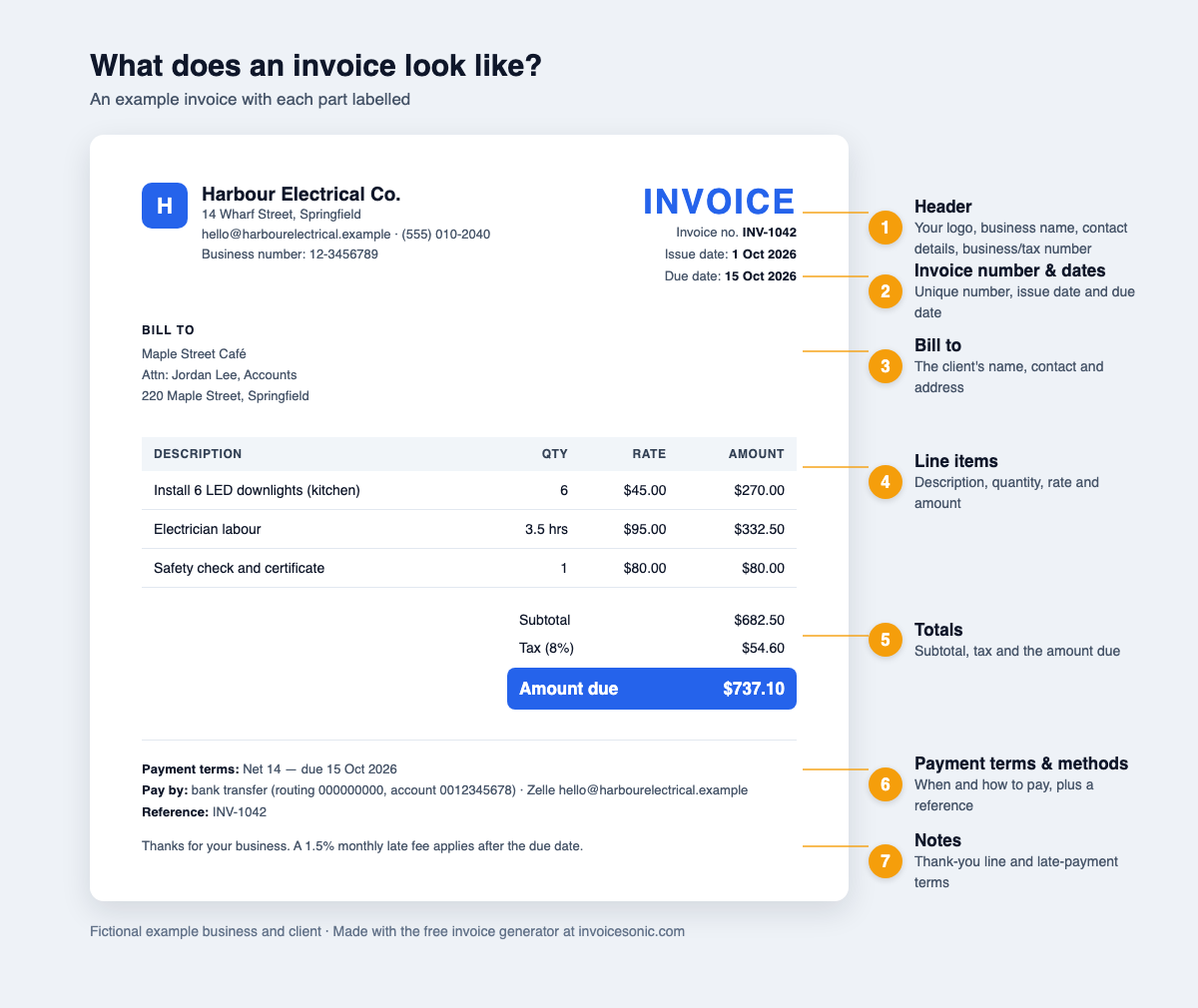
What does an invoice look like? A professional invoice is a one-page document with your business details and the word "Invoice" at the top, the client's details and dates below that, a table of line items in the middle, totals on the right, and payment terms at the bottom. The layout is almost identical across industries, so once you know the parts you can read or build any invoice in minutes.
Written by InvoiceSonic Editorial Team · Updated 10 September 2026
What an invoice looks like, top to bottom
Most invoices follow the same reading order, because the person paying needs to answer four questions quickly: who sent this, what is it for, how much is owed, and by when. A clean layout puts the answers in that order.
- Header: your logo, trading name and contact details, plus the word "Invoice"
- Reference block: the invoice's reference code and the date it was issued
- Bill to: the client's name, company and billing address
- Item table: description, quantity, rate and amount for each row
- Totals: subtotal, taxes, discounts and the total amount due
- Payment section: when payment is due, payment terms and payment methods
- Notes: a thank-you line, late-payment policy or project reference
The header: who is billing whom
The header identifies the sender. Put your business name exactly as it appears on your bank account, followed by your address, email and phone. A logo is optional but makes the document instantly recognisable in a crowded inbox. Directly opposite, print the word "Invoice" in large type so the document can't be mistaken for a quote or a statement.
Invoice number and invoice date
Every invoice needs its own reference so you and your client can find it later. Use a simple sequence such as INV-1001, INV-1002 and INV-1003 and never reuse one. Next to it, show the invoice date, the day you issued the document, because payment terms are counted from that date. An invoice number generator keeps the sequence unbroken if you bill often.
Bill to: the client's details
Under the header, add a "Bill to" block with the customer's name, company name and billing address. For business clients, add the person or department that approves payment and any purchase order reference they gave you. Missing PO numbers are one of the most common reasons large companies send an invoice back unpaid.
Items, unit prices and line total
The line items table is the heart of the invoice. Each row describes one product or piece of work with four columns: description, quantity (or hours), rate and amount. Write descriptions a stranger could understand: "Kitchen tap replacement, parts and 2 hours labour" beats "Plumbing work." Multiply quantity by the rate to get each row's amount, list unit prices clearly, and keep one row per distinct item so the client can check your maths.
Subtotal, tax and total amount due
Below the table, stack the totals on the right-hand side: the subtotal, any discount, each of the applicable taxes on its own line with its rate, and finally the amount due in bold. Showing tax separately matters. In many countries it is a legal requirement, and it lets business clients claim the tax back. If the client has paid a deposit, subtract it here so the final figure is the balance actually owed.
Due date, payment terms and payment methods
Near the bottom, state the due date as a real calendar date rather than only "Net 30", because a specific date removes any argument about when payment was expected. Then spell out your payment terms, for example: "Payment due within 14 days. Late fees of 1.5% per month apply after that date." Clear terms also make overdue invoices easier to chase.
Finally, list the payment methods you accept: bank transfer details, a card payment link, PayPal, Venmo or a check address. The easier you make paying, the faster you get paid and the steadier your cash flow.
Notes and terms
Use the notes area for anything that helps the invoice get approved: a thank-you, the project name, a warranty reminder or who to contact with questions. Keep legal terms short and put longer contract terms in a separate agreement.
Invoice examples by type of business
The structure stays the same, but what goes in the table changes with the work you do.
- Freelancer: one row per deliverable or block of hours, e.g. "Logo design, 3 concepts, 2 revisions." A freelance designer often adds the project name and a usage licence in the notes.
- Trades and contractors: separate rows for labour and materials, with the job address and a job reference so the client can match it to the quote.
- Retail and wholesale: one row per product with SKU, quantity and unit price, plus shipping as its own row.
- Consultants and agencies: a monthly retainer row, then any extra hours billed at the agreed hourly rate.
Invoice format by country
The core layout is universal, but tax rules change what an invoice must show.
- United States: there is no federal invoice format. If you collect sales tax, show the taxable amount and the tax as separate lines.
- Australia: a GST-registered business issues a tax invoice with the words "Tax Invoice", its ABN and the GST amount; sales of $1,000 or more also need the buyer's identity.
- United Kingdom and EU: a VAT invoice must show your VAT number, the VAT rate and the VAT amount for each item.
Invoice vs receipt vs quote
These three documents look alike but do different jobs. A quote comes before the work and estimates the price. An invoice comes after the work and asks for payment. A receipt comes after payment and confirms the money was received. Label each document clearly so nobody pays a quote or files a receipt as an unpaid bill.
A simple invoice sample
Here is a plain-text invoice sample you can copy and adapt:
- Brightside Design LLC, 12 Main St, Austin TX, hello@brightside.co
- INVOICE INV-1042. Issued 1 September 2026. Due 15 September 2026
- Bill to: Harbor Coffee Co., Attn: Accounts Payable, PO 5531
- Website homepage redesign: 1 x $1,200 = $1,200
- Two rounds of revisions: 4 hours x $75 = $300
- Subtotal $1,500. Sales tax 0%. Total due $1,500
- Pay by bank transfer or card link within 14 days. Thank you for your business.
Common invoice mistakes to avoid
- Vague descriptions that force the client to email you with questions
- No payment deadline, or only "due on receipt" with no calendar date
- Missing tax details, which can make the document invalid for tax purposes
- Reused or skipped reference codes that make your records hard to audit
- Payment details only in the email body instead of on the invoice itself
- Sending to a general inbox instead of the person who approves payment
How to make an invoice that looks professional
Start from one of our free invoice templates in PDF or Word, or fill in your details online and download a PDF. Keep fonts consistent, leave white space around the totals, and send it as a PDF so the layout looks the same on every device. For a field-by-field checklist, see our guide to what to include on an invoice, linked below.
Annotated invoice example
The numbered labels identify each required part. Replace every example value with your own.
1. Your Business Pty Ltd
ABN 12 345 678 901
2. TAX INVOICE
#INV-0001
3. Bill to
Client Name
4. Issue date
05 Jun 2026
Due date
19 Jun 2026
Download blank PDF · Edit in Word or Google Docs · Edit online
Australian tax invoice requirements
A valid Australian tax invoice must show the words “Tax Invoice”, your business name and ABN, the date of issue, a description of the goods or services, the GST amount (or a statement that the total includes GST), and the total price. For sales over $1,000 you must also include the buyer’s identity or ABN.
- Register for GST once your turnover reaches $75,000 per year — see ATO: Registering for GST.
- Without an ABN, the payer must withhold 47% of the payment under PAYG rules (ATO: PAYG withholding). Apply for a free ABN at abr.gov.au.
- Full rules: ATO: Tax invoices.
Or use our invoice generator to start from scratch.
From sent to paid
The invoice is only step one
Create a one-off PDF free. When invoicing becomes a workflow, save the invoice, see what is due or overdue, and let InvoiceSonic follow up automatically.
- ✓ Save and send invoices
- ✓ Track sent, viewed and overdue
- ✓ Automate payment reminders
- ✓ Record payment and send a receipt
What do you need today?
Choose the shortest path. You can move from the free tool to tracking later.
FAQ
What should an invoice look like for a small business?
Clean and scannable: your name and contact details at the top, the client's details and dates underneath, a clear table of what you supplied, totals on the right, and payment instructions at the bottom. One page is ideal.
What is the standard invoice format?
The standard format is header, reference and date, bill-to details, item table, totals and payment terms, in that order. Most businesses send it as a PDF.
Does an invoice need a logo?
No. A logo is optional; the required parts are your details, the client's details, dates, what you supplied, the total and how to pay. A logo simply makes a professional invoice easier to recognise.
Can I use a generic invoice for any business?
Yes. A generic invoice with the standard fields works for most businesses. Add industry details, such as a job address for trades or hours for freelancers, in the item descriptions or notes.
How do I send an invoice?
Save it as a PDF and email it to the person who approves payment, with the reference and amount in the subject line. Follow up with a polite reminder shortly before payment is expected.
What's the difference between an invoice and a tax invoice?
A tax invoice is a specific document issued by a business registered for GST or VAT. It must show the tax registration number and the tax amount so the buyer can claim it back. A regular invoice has no such requirement.