Free Babysitting Invoice Template Invoice Template
A free, professional babysitting invoice template you can download as Word, Excel, PDF, Google Docs, or Google Sheets. Made for sitters and nannies who want to bill parents clearly for hours watched, extra kids, and late nights. Itemize your hourly rate, overtime, and reimbursed expenses so payment is simple and there's no awkward math at pickup.
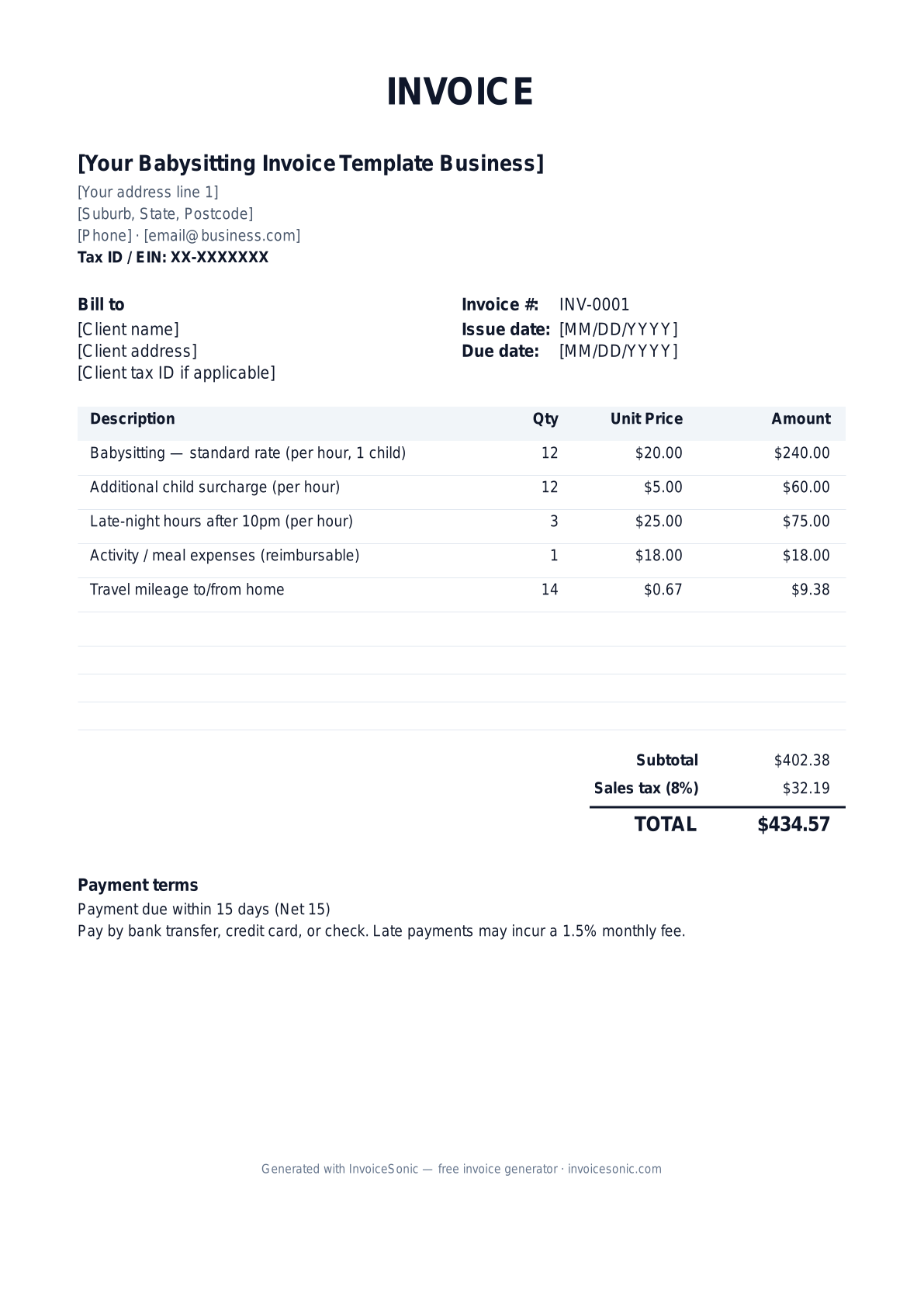
Download the babysitting invoice template invoice template
Or build it online in 60 seconds
Use InvoiceSonic's free generator — auto-calculate tax, prefill your details, and email the PDF straight to your client. No formatting needed.
Try the live generator →What's on the babysitting invoice template invoice template
| Description | Qty | Unit price | Amount |
|---|---|---|---|
| Babysitting — standard rate (per hour, 1 child) | 12 | $20.00 | $240.00 |
| Additional child surcharge (per hour) | 12 | $5.00 | $60.00 |
| Late-night hours after 10pm (per hour) | 3 | $25.00 | $75.00 |
| Activity / meal expenses (reimbursable) | 1 | $18.00 | $18.00 |
| Travel mileage to/from home | 14 | $0.67 | $9.38 |
| Subtotal | $402.38 | ||
| Sales tax (8%) | $32.19 | ||
| Total | $434.57 | ||
Example figures — every field is editable in the download.
Who uses this template
- ✓Independent babysitters
- ✓Part-time and date-night sitters
- ✓After-school caregivers
- ✓Occasional and weekend nannies
- ✓Teen and college student sitters
What to include
- ✓Dates and hours worked per session
- ✓Number of children watched
- ✓Base hourly rate and any surcharges
- ✓Late-night or holiday premium hours
- ✓Reimbursable expenses (snacks, activities)
- ✓Mileage if you traveled to the family
- ✓Total due and accepted payment methods (Venmo, Zelle, cash)
Available in 5 formats
Word (.docx)
Fully editable in Microsoft Word, Google Docs, Apple Pages and LibreOffice — best for quick text edits.
Excel (.xlsx)
Line totals, subtotal and tax calculate automatically — best if you want the math done for you.
A clean, print-ready, fixed layout — best for emailing a finished invoice to a client.
Google Docs / Sheets
Open in your browser, then File → Make a copy to edit and share with your team.
Invoicing tips for babysitting invoice template
- ✓ Log start and end times per session so parents can verify hours at a glance.
- ✓ Add a per-hour surcharge for each extra child rather than guessing a higher flat rate.
- ✓ Charge a small premium for hours after a set time (like 10pm) and note it as its own line.
- ✓ Track reimbursable snack and activity costs separately and keep receipts to hand over.
- ✓ List the payment apps you accept (Venmo, Zelle, cash) so parents can pay you the same day.
Babysitting Invoice Template invoice FAQ
Do babysitters need to charge sales tax?
No. Babysitting is a personal service and is not subject to sales tax in US states. You may owe income tax on what you earn, so keep your invoices as records, but you don't add a sales tax line for parents.
Should I be paid as an employee or contractor?
Occasional sitters are usually treated as independent and simply invoice the family. If you work regular hours for one family above the IRS household-employee threshold, the parents may owe nanny taxes — worth confirming with them.
How do I handle different rates for more kids?
Keep your base hourly rate for one child, then add a per-hour surcharge line for each additional child. This is clearer than juggling separate flat rates and scales naturally with bigger families.
What's the easiest way for parents to pay a babysitting invoice?
Most families pay sitters via Venmo, Zelle, or cash the same night. List your preferred apps and handle on the invoice, and set the total due on receipt rather than offering Net terms.
Related invoice templates
Prefer a specific format? Word invoice template · Excel invoice template · PDF invoice template · Google Docs invoice template · All invoice templates