Free Estimate Template: Word, Excel and PDF
This estimate template is free in Word, Excel and fillable PDF: itemize labor and materials, mark taxable lines, add a deposit and a line saying you'll ask before going more than 10% over. Download a file, or fill in the estimate builder below and download a PDF.
Free · No signup · Word, Excel and fillable PDF · Example rows included
Create your invoice online
Download the estimate template (Word, Excel or PDF)
One layout in three formats: business block and estimate number, the client and job site, a line-item table with a taxable flag, totals with an optional contingency and deposit, terms and a signature line.
- Estimate template (.docx): Edit in Word, Pages or Google Docs.
- Estimate template (.xlsx): Line totals, tax and the total calculate for you. Opens in Google Sheets.
- Estimate template (.pdf): Fillable form on page 1, a filled example on page 2. Print it or type into it.
Free, no signup and no email needed. Rows marked "(example)" are samples to type over. Each file carries a small "Template by InvoiceSonic" footer that you can delete.
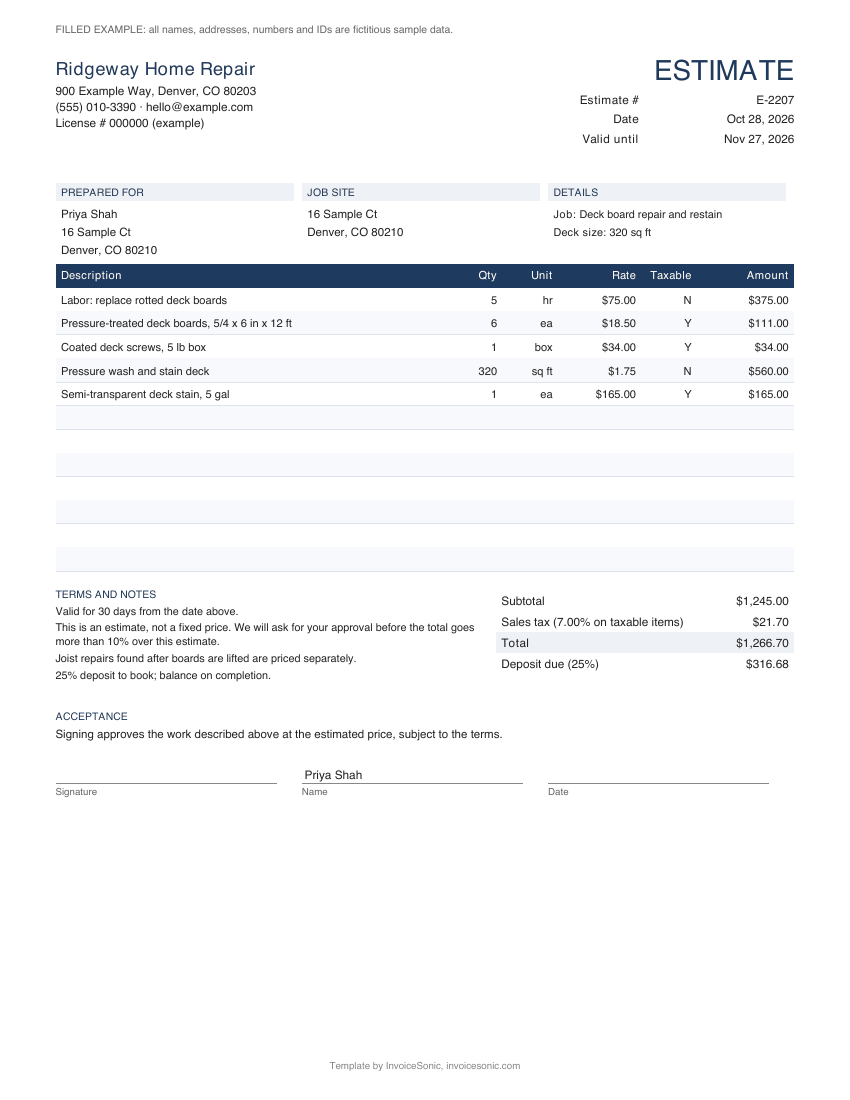
Estimate template example: deck repair and restain
A handyman estimate for replacing rotted deck boards and restaining a 320 sq ft deck in Denver. The business and client are made up; the rates are typical.
| Item | Qty | Rate | Taxable | Amount |
|---|---|---|---|---|
| Labor: replace rotted deck boards | 5 hr | $75.00 | N | $375.00 |
| Pressure-treated deck boards, 5/4 x 6 in x 12 ft | 6 ea | $18.50 | Y | $111.00 |
| Coated deck screws, 5 lb box | 1 box | $34.00 | Y | $34.00 |
| Pressure wash and stain deck | 320 sq ft | $1.75 | N | $560.00 |
| Semi-transparent deck stain, 5 gal | 1 ea | $165.00 | Y | $165.00 |
| Subtotal | $1,245.00 | |||
| Sales tax (7% on $310.00 of taxable lines) | $21.70 | |||
| Total | $1,266.70 | |||
| Deposit due (25%) | $316.68 | |||
Sales tax at an example 7% applies to the $310.00 of materials only. The terms say joist repairs found after the boards come up are priced separately. On repair work, that one line prevents most disputes.
Free estimate templates by trade
Each trade prices differently, so these versions come with trade-specific fields and a filled example:
- Contractor estimate template: trade lines, subs, contingency and a payment schedule (kitchen remodel example).
- Construction estimate template: labor, materials, equipment and disposal with quantity math (driveway example).
- Roofing estimate template: priced per square with a decking allowance (24-square re-roof).
- Landscaping estimate template: sod, pavers, plants, mulch and irrigation by unit.
- Auto repair estimate template: vehicle and VIN fields, parts and labor, customer authorization.
What to include in an estimate
Your business details
Name, contact details and license or tax number where it applies to your trade.
An estimate number
Numbering makes the job easy to reference when the client comes back weeks later.
Itemized scope
Labor, materials and equipment listed separately. Clients accept detail and argue with lump sums.
Clearly marked as an estimate
Say it's an approximation and what could change it. That's the difference between a professional estimate and a broken promise.
Exclusions and assumptions
What's not included, and what you've assumed about site access, condition or materials.
Validity and terms
How long the number stands, the deposit you need, and how change orders will be priced.
How to fill in the estimate template
-
1
Add your business and the client
Replace the bracketed fields with your details, then the client's name and the job address.
-
2
Number and date it
Give the estimate a number and a valid-until date, usually 30 days out.
-
3
List labor and materials separately
Type over the example rows. Put labor on its own lines (hours x rate) and materials on theirs, and mark taxable lines Y.
-
4
Set tax, contingency and deposit
In the Excel file, enter your sales tax rate, an optional contingency percent and the deposit percent in the yellow cells.
-
5
State the overrun rule and send
Keep the line saying you'll ask before going more than 10% over, list exclusions, then save as PDF and send it for signature.
Job done? Turn the estimate into an invoice
Switch it to an invoice, adjust the final numbers and send it, then track it through to paid.
Create an invoiceFrequently asked questions
What is an estimate template?
An estimate template is a reusable document for giving a client an approximate price before work starts. It lists the expected labor, materials and total, and makes clear the figure may change as the job reveals itself.
Is an estimate legally binding?
Generally an estimate is an approximation, not a fixed commitment, which is why it must be labeled as an estimate. A quote is a fixed price and can bind you to it. Some states also set rules for specific trades, such as auto repair, so check yours.
How much can an estimate change?
There's no universal rule, so set one yourself: state that you'll get the client's approval before exceeding the estimate by more than an agreed percentage, commonly 10-15%. Clients accept overruns they were warned about and dispute ones they weren't.
Can I use this estimate template in Google Docs or Google Sheets?
Yes. Upload the .docx to Google Drive and open it with Google Docs, or open the .xlsx with Google Sheets. The Sheets version keeps the formulas, so line totals, tax and the total still calculate.
How do I turn an estimate into an invoice?
If you built the estimate on this page, switch it to an invoice after downloading and adjust the final figures.
Related tools & guides
Contractor estimate template · Construction estimate template · Roofing estimate template · Quote template · Quoting system · Quote software · Free invoice generator