Free Air Conditioning Invoice Template
A free, professional air conditioning invoice template available as Word, Excel, PDF, Google Docs, or Google Sheets. Built for HVAC and AC techs, it itemizes service calls, refrigerant, parts, and labor, with space for the unit model and serial number. Use it for repairs, tune-ups, or full system installs.
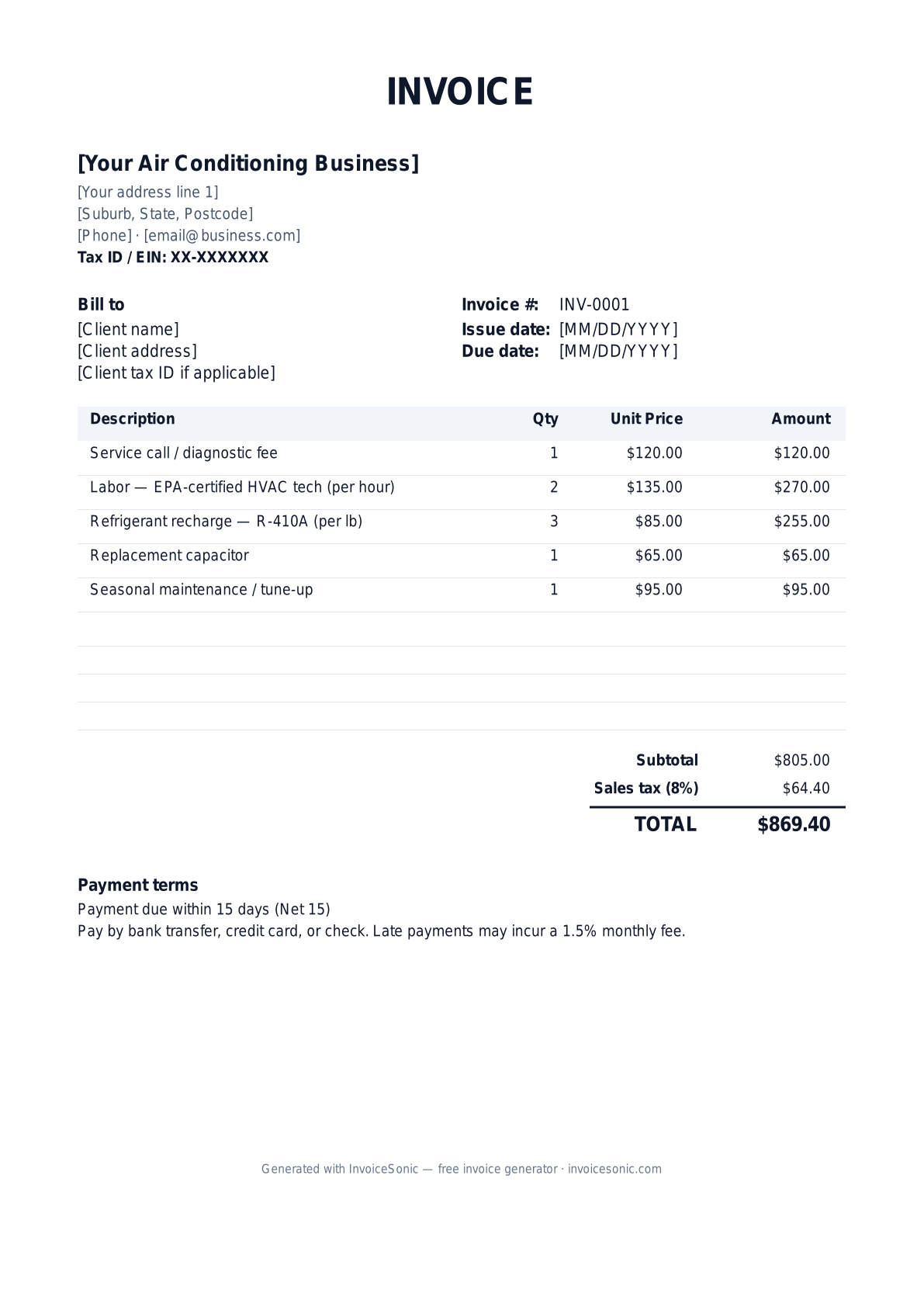
Download the air conditioning invoice template
Or build it online in 60 seconds
Use InvoiceSonic's free generator — auto-calculate tax, prefill your details, and email the PDF straight to your client. No formatting needed.
Try the live generator →What's on the air conditioning invoice template
| Description | Qty | Unit price | Amount |
|---|---|---|---|
| Service call / diagnostic fee | 1 | $120.00 | $120.00 |
| Labor — EPA-certified HVAC tech (per hour) | 2 | $135.00 | $270.00 |
| Refrigerant recharge — R-410A (per lb) | 3 | $85.00 | $255.00 |
| Replacement capacitor | 1 | $65.00 | $65.00 |
| Seasonal maintenance / tune-up | 1 | $95.00 | $95.00 |
| Subtotal | $805.00 | ||
| Sales tax (8%) | $64.40 | ||
| Total | $869.40 | ||
Example figures — every field is editable in the download.
Who uses this template
- ✓HVAC repair and service companies
- ✓Residential AC installation contractors
- ✓Commercial refrigeration technicians
- ✓Heat pump and mini-split installers
- ✓Maintenance-plan HVAC providers
What to include
- ✓Unit make, model, and serial number
- ✓Service call / diagnostic fee
- ✓Labor hours and EPA-certified rate
- ✓Refrigerant type and pounds added
- ✓Parts replaced (capacitor, contactor, motor)
- ✓Warranty on parts and labor
- ✓Maintenance plan or membership credits
Available in 5 formats
Word (.docx)
Fully editable in Microsoft Word, Google Docs, Apple Pages and LibreOffice — best for quick text edits.
Excel (.xlsx)
Line totals, subtotal and tax calculate automatically — best if you want the math done for you.
A clean, print-ready, fixed layout — best for emailing a finished invoice to a client.
Google Docs / Sheets
Open in your browser, then File → Make a copy to edit and share with your team.
Invoicing tips for air conditioning
- ✓ Record the unit's model and serial number for warranty and future service
- ✓ Always log refrigerant type and the exact pounds added — EPA rules require tracking
- ✓ Separate the diagnostic/service-call fee from labor and parts
- ✓ Note whether parts are under manufacturer warranty to avoid double-charging
- ✓ Offer and itemize a maintenance plan credit to encourage repeat business
Air Conditioning invoice FAQ
Why should I log refrigerant on the invoice?
EPA regulations require tracking refrigerant type and quantity, and customers want transparency since refrigerant is a significant cost. List the type (e.g. R-410A) and pounds added on a separate line.
Is HVAC labor taxable?
Parts are generally taxable; labor may be taxed or exempt depending on your state and whether the job is a repair or a capital improvement like a new system install. Confirm your state's rules.
Should I charge a separate diagnostic fee?
Yes, it's standard. List the service-call or diagnostic fee separately from repair labor; many shops credit it toward the repair if the customer approves the work.
What warranty should I show?
Distinguish your labor warranty from the manufacturer's parts warranty. New equipment often carries a multi-year manufacturer warranty while your workmanship coverage is shorter.
Related invoice templates
Prefer a specific format? Word invoice template · Excel invoice template · PDF invoice template · Google Docs invoice template · All invoice templates
A practical guide to HVAC billing
Use the template as a starting layout, then replace its example information with the actual agreed work. The details below help you decide what to enter and what to check before sending.
Agree what this invoice covers
Separate maintenance, fault diagnosis, repair and new installation. Identify the equipment serviced and explain what a maintenance package includes. Obtain approval for replacement parts or additional repair work discovered during the visit.
Give the payer enough context
Include the property address, equipment reference, service date and work-order number. Check the legal billing name and delivery contact against the accepted work. Keep the accepted maintenance or installation scope, approved repairs and completion record available to resolve questions. An invoice records the charge; it does not replace the underlying approval or supporting documents.
Worked HVAC invoice example
Two units receive the agreed service, with one approved component billed separately. Identify the actual equipment and scope; these prices are not installation estimates or local market rates.
| Description | Quantity | Rate | Amount |
|---|---|---|---|
| Scheduled unit maintenance | 2 | 95.00 | 190.00 |
| Approved replacement component | 1 | 120.00 | 120.00 |
| Example subtotal | 310.00 | ||
Avoid this billing mistake
Charging a separate labour line when installation labour is already included in a supplied-and-fitted part can lead to a dispute. Match the invoice to the quoted supply basis.
Follow up on the right record
For managed buildings, use the work order and payer’s equipment reference. Keep warranty, maintenance schedules and technical compliance documentation separate from the payment record.
Before you send
- Match the line items and quantities to the accepted scope and approved changes.
- Check the invoice number, issue date, explicit due date and the property address, equipment reference, service date and work-order number.
- Apply only the tax treatment relevant to your business and location; check current local requirements if unsure.
- Keep earlier billing separate from actual payments. Verify the outstanding amount and payment instructions.
The free browser tool prepares the document. Saving customers, sending tracked invoices and managing reminders require an account and are subject to plan limits. Payment status needs accurate payment records; an invoice view alone does not confirm payment.