Free Real Estate Agent Invoice Template
A free, professional real estate agent invoice template for Australian agents and agencies. Download as Word, Excel, or PDF — for commission settlements, vendor marketing fees, and property management invoices.
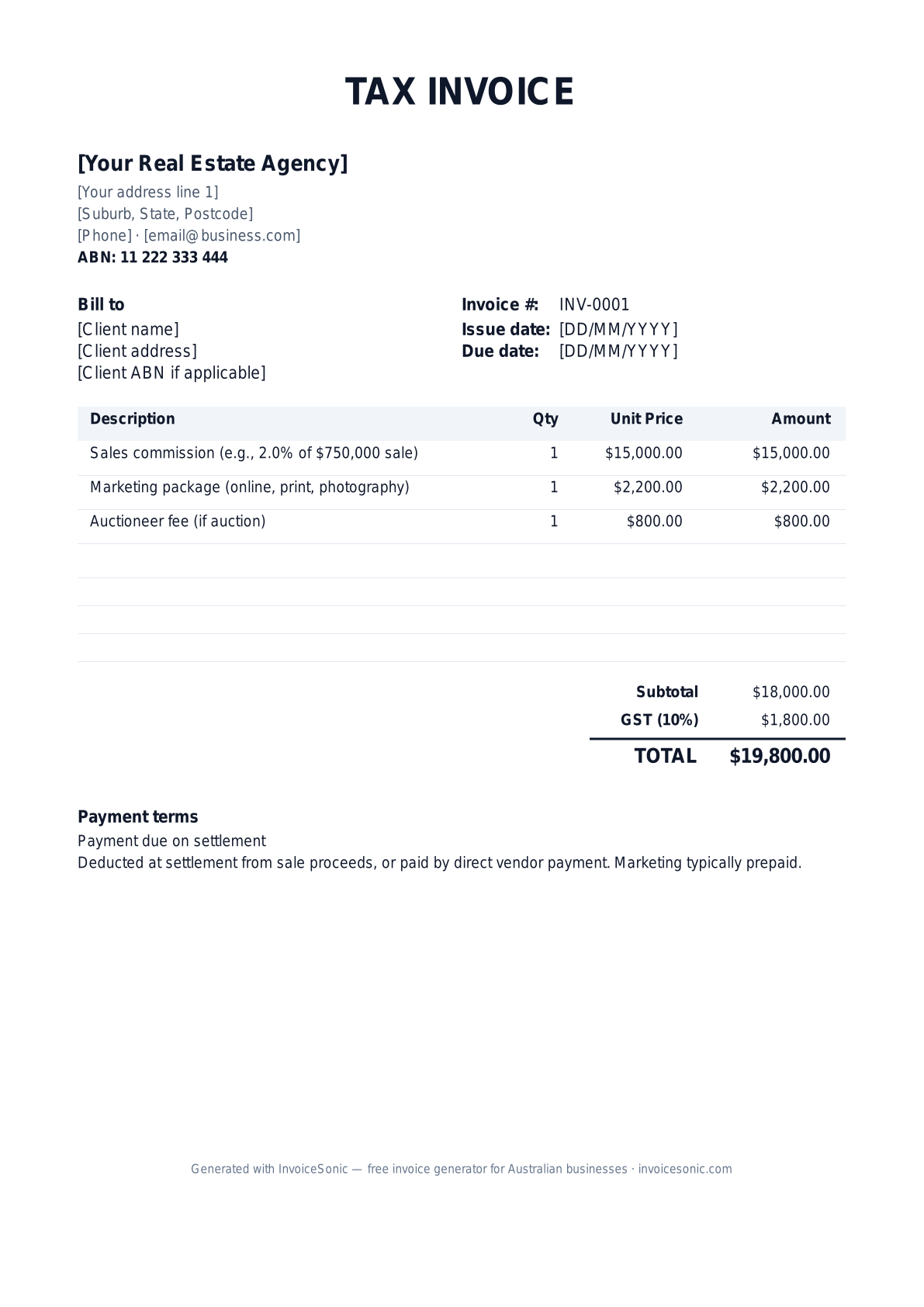
Download the real estate agent invoice template
Or build it online in 60 seconds
Use InvoiceSonic's free generator — auto-calculate tax, prefill your details, and email the PDF straight to your client. No formatting needed.
Try the live generator →What's on the real estate agent invoice template
| Description | Qty | Unit price | Amount |
|---|---|---|---|
| Sales commission (e.g., 2.0% of $750,000 sale) | 1 | $15,000.00 | $15,000.00 |
| Marketing package (online, print, photography) | 1 | $2,200.00 | $2,200.00 |
| Auctioneer fee (if auction) | 1 | $800.00 | $800.00 |
| Subtotal | $18,000.00 | ||
| Sales tax (8%) | $1,440.00 | ||
| Total | $19,440.00 | ||
Example figures — every field is editable in the download.
Who uses this template
- ✓Real estate sales agents
- ✓Property managers
- ✓Auctioneers
- ✓Buyers agents
- ✓Commercial real estate brokers
What to include
- ✓Agency name, ABN, and licence number
- ✓Vendor/buyer name
- ✓Property address
- ✓Sale price (if commission)
- ✓Commission percentage and dollar amount
- ✓Marketing package breakdown
- ✓GST line and total
Available in 5 formats
Word (.docx)
Fully editable in Microsoft Word, Google Docs, Apple Pages and LibreOffice — best for quick text edits.
Excel (.xlsx)
Line totals, subtotal and tax calculate automatically — best if you want the math done for you.
A clean, print-ready, fixed layout — best for emailing a finished invoice to a client.
Google Docs / Sheets
Open in your browser, then File → Make a copy to edit and share with your team.
Invoicing tips for real estate agent
- ✓ Reference the agency agreement on every commission invoice
- ✓ Itemise marketing fees separately — these are often prepaid by the vendor
- ✓ Real estate agents must include their licence number — required in every state
- ✓ For property management, invoice monthly rent collection statements separately
- ✓ Settlement statements should reference the conveyancing file number
Real Estate Agent invoice FAQ
Do real estate commissions include GST?
Yes — commissions are taxable supplies, and the GST is calculated on the commission, not the sale price. Show GST as a separate line.
When is the commission invoice issued?
On the day of settlement (or immediately after). The conveyancer pays it from the settlement proceeds.
Should marketing fees be invoiced separately?
Yes — marketing is usually prepaid by the vendor before the property goes to market. Commission is invoiced at settlement.
What payment terms apply?
Commission: paid at settlement. Marketing: typically paid upfront before the campaign launches. Property management fees: deducted from monthly rent collections.
Related invoice templates
Prefer a specific format? Word invoice template · Excel invoice template · PDF invoice template · Google Docs invoice template · All invoice templates
A practical guide to property services billing
Use the template as a starting layout, then replace its example information with the actual agreed work. The details below help you decide what to enter and what to check before sending.
Agree what this invoice covers
Identify the property and the service your business actually supplied. Separate agreed management or service fees from approved reimbursable costs. Keep funds held for clients and payments made directly to contractors distinct from your own invoiced revenue.
Give the payer enough context
Include the property reference, management agreement or work order and service period. Check the legal billing name and delivery contact against the accepted work. Keep the fee agreement, service record and approval for reimbursable costs available to resolve questions. An invoice records the charge; it does not replace the underlying approval or supporting documents.
Worked property services invoice example
This example shows a fixed service fee, not a commission calculation or client-money statement. Use the actual agreement and an appropriate accounting process for commissions or funds held for others.
| Description | Quantity | Rate | Amount |
|---|---|---|---|
| Agreed property-service fee — monthly period | 1 | 250.00 | 250.00 |
| Approved reimbursable cost | 1 | 60.00 | 60.00 |
| Example subtotal | 310.00 | ||
Avoid this billing mistake
Using an occupant’s name as the payer without checking the agreement can send the bill to the wrong party. Confirm the legal billing entity and property reference.
Follow up on the right record
If one customer has multiple properties, keep each charge traceable to its property and period. InvoiceSonic’s invoice tracker is not a trust-accounting or property-management system.
Before you send
- Match the line items and quantities to the accepted scope and approved changes.
- Check the invoice number, issue date, explicit due date and the property reference, management agreement or work order and service period.
- Apply only the tax treatment relevant to your business and location; check current local requirements if unsure.
- Keep earlier billing separate from actual payments. Verify the outstanding amount and payment instructions.
The free browser tool prepares the document. Saving customers, sending tracked invoices and managing reminders require an account and are subject to plan limits. Payment status needs accurate payment records; an invoice view alone does not confirm payment.