Free Catering Invoice Template
A free, professional catering invoice template available as Word, Excel, PDF, Google Docs, or Google Sheets. Designed for caterers and event chefs, it breaks down per-head menu pricing, staffing, rentals, and gratuity so clients can read the bill at a glance. Drop in your deposit terms and headcount and the totals update automatically.
Or build it online in 60 seconds
Use InvoiceSonic's free generator — auto-calculate tax, prefill your details, and email the PDF straight to your client. No formatting needed.
Try the live generator →What's on the catering invoice template
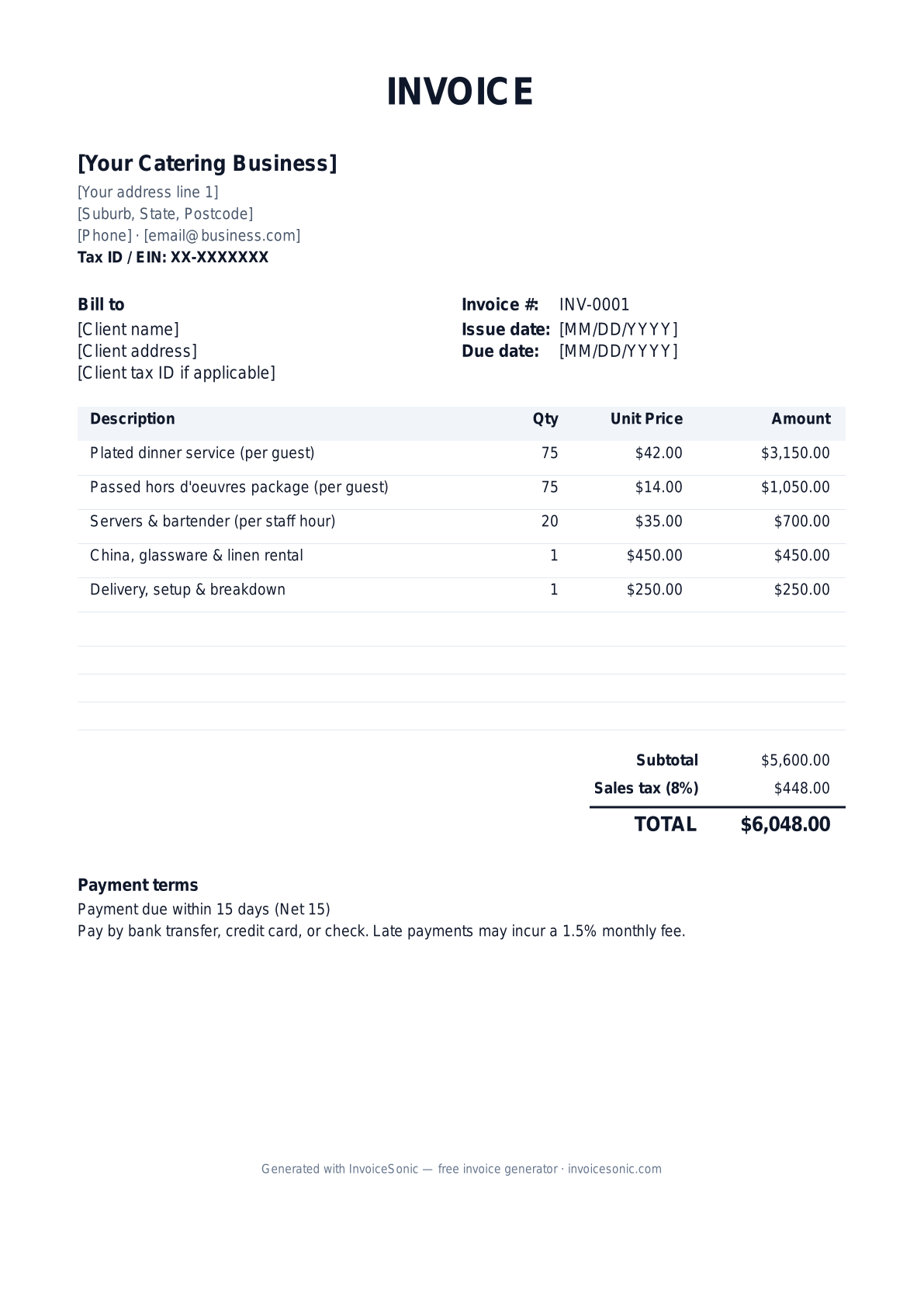
| Description | Qty | Unit price | Amount |
|---|---|---|---|
| Plated dinner service (per guest) | 75 | $42.00 | $3,150.00 |
| Passed hors d'oeuvres package (per guest) | 75 | $14.00 | $1,050.00 |
| Servers & bartender (per staff hour) | 20 | $35.00 | $700.00 |
| China, glassware & linen rental | 1 | $450.00 | $450.00 |
| Delivery, setup & breakdown | 1 | $250.00 | $250.00 |
| Subtotal | $5,600.00 | ||
| Sales tax (8%) | $448.00 | ||
| Total | $6,048.00 | ||
Example figures — every field is editable in the download.
Who uses this template
- ✓Full-service catering companies
- ✓Private chefs and meal-prep caterers
- ✓Wedding and event caterers
- ✓Food truck and corporate-lunch caterers
- ✓BBQ and taco-bar caterers
What to include
- ✓Event date, time, and venue address
- ✓Guaranteed guest count / headcount
- ✓Per-person menu pricing by course
- ✓Staffing hours and roles (servers, bartenders, chefs)
- ✓Rental and equipment charges
- ✓Deposit paid and remaining balance due
- ✓Service charge or gratuity and sales tax
Available in 5 formats
Word (.docx)
Fully editable in Microsoft Word, Google Docs, Apple Pages and LibreOffice — best for quick text edits.
Excel (.xlsx)
Line totals, subtotal and tax calculate automatically — best if you want the math done for you.
A clean, print-ready, fixed layout — best for emailing a finished invoice to a client.
Google Docs / Sheets
Open in your browser, then File → Make a copy to edit and share with your team.
Invoicing tips for catering
- ✓ Bill the menu per guest and show the final guaranteed headcount used
- ✓ Separate the service charge from gratuity — they're taxed and distributed differently
- ✓ List your non-refundable deposit and the balance-due date clearly
- ✓ Itemize rentals (china, linens, tents) apart from food so clients can trim costs
- ✓ Note any allergy or dietary accommodations you provided for your records
Catering invoice FAQ
Is catering subject to sales tax?
In most states prepared food and catering services are taxable, and some states also tax mandatory service charges and rentals. Check your state's rules — gratuity that is truly voluntary is usually not taxed.
How should I handle the deposit on the invoice?
Show the original total, subtract the deposit already paid as a separate line, and display the remaining balance due. This makes the math transparent for the client.
What's the difference between a service charge and a tip?
A service charge is a mandatory fee you set (often 18–22%) that you control and may be taxable. A tip is voluntary and goes to staff. Label them separately to avoid confusion.
When should the final balance be due?
Many caterers collect a deposit at booking and the remaining balance shortly before or on the event date, often based on the guaranteed headcount finalized 72 hours out.
Related invoice templates
Prefer a specific format? Word invoice template · Excel invoice template · PDF invoice template · Google Docs invoice template · All invoice templates
A practical guide to catering billing
Use the template as a starting layout, then replace its example information with the actual agreed work. The details below help you decide what to enter and what to check before sending.
Agree what this invoice covers
Record the agreed menu, guest count and deadline for final numbers. Separate food, staffing, equipment and delivery when the agreement prices them separately. Document changes after the final confirmation so the client can follow how the final amount was reached.
Give the payer enough context
Include the event name, event date, venue and booking reference. Check the legal billing name and delivery contact against the accepted work. Keep the accepted menu and price, confirmed headcount, approved extras and deposit record available to resolve questions. An invoice records the charge; it does not replace the underlying approval or supporting documents.
Worked catering invoice example
The food charge follows the confirmed guest count, with separately agreed staffing and setup. This example is before any deposit or tax. Apply only the deposit actually received against the appropriate balance.
| Description | Quantity | Rate | Amount |
|---|---|---|---|
| Confirmed meals | 40 | 30.00 | 1,200.00 |
| Service staff hours | 6 | 35.00 | 210.00 |
| Agreed delivery and setup | 1 | 90.00 | 90.00 |
| Example subtotal | 1,500.00 | ||
Avoid this billing mistake
Subtracting a requested but unpaid booking deposit understates the amount owed. Reconcile the deposit record before issuing the final invoice, and make any agreed cancellation or headcount adjustment explicit.
Follow up on the right record
Send the invoice to the booking contact and named payer as agreed. For company events, add the purchase order early. Keep equipment-return or breakage charges separate and supported by the booking terms and actual records.
Before you send
- Match the line items and quantities to the accepted scope and approved changes.
- Check the invoice number, issue date, explicit due date and the event name, event date, venue and booking reference.
- Apply only the tax treatment relevant to your business and location; check current local requirements if unsure.
- Keep earlier billing separate from actual payments. Verify the outstanding amount and payment instructions.
The free browser tool prepares the document. Saving customers, sending tracked invoices and managing reminders require an account and are subject to plan limits. Payment status needs accurate payment records; an invoice view alone does not confirm payment.