For solo contractors and small service businesses
Job Management Software
Stop losing the next step between the call and the invoice.
A customer calls. You need to remember the site, send a price, book the visit and bill the finished work. Add the job and client now; fill in the details as they become clear. InvoiceSonic keeps the next action visible alongside the quote, appointment and invoice.
Already have an account? Open Jobs
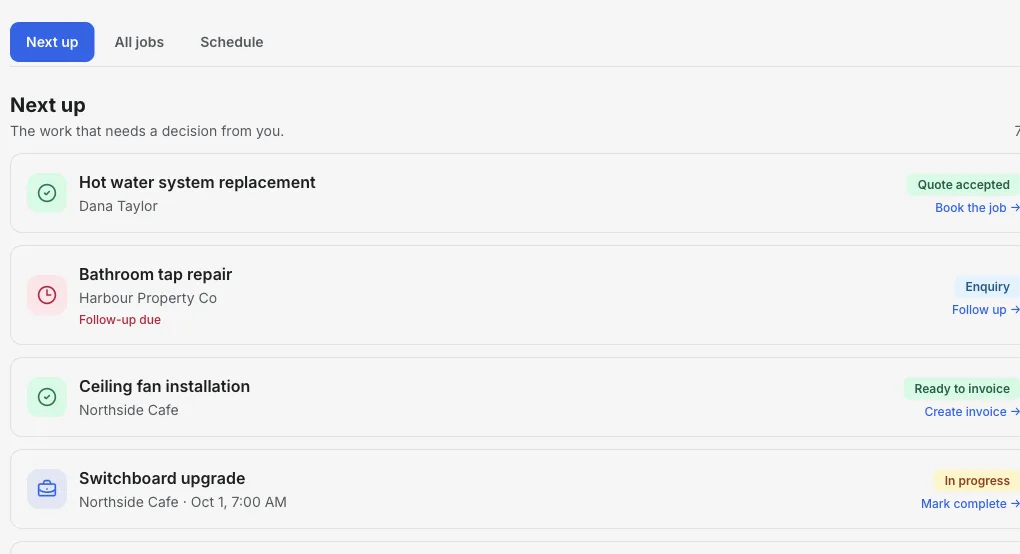
Inside the Jobs workspace
Open Jobs. See what needs a decision.
The Next up view puts a late follow-up, a job ready to invoice and booked work in the same short list. Open any job to see the client, notes, time and linked documents.
- 01
Start with two fields
Add the job name and client. Site details, notes and timing can come later.
- 02
Work from Next up
Follow-ups due and jobs ready to invoice are called out before they disappear in a long list.
- 03
Finish from the job
Open the record to quote, book, change its stage or create the invoice with the client attached.
Product walkthrough
Watch a job move through the workspace
This 18-second sample-data recording shows a new job being added, given a visit time and surfaced when it is ready to invoice.
Demo data · no sound · play when you are ready
One place to run the job
One record per job
Keep the client, site, notes, job status, appointment and linked quote or invoice together. Return to the job when the client calls.
A practical next-up list
See enquiries to quote, upcoming work and jobs awaiting an invoice so the next action is clear.
Schedule the work
Add an appointment to a job and review scheduled work by day. Move a date when plans change.
Quote before you start
Create a quote from the job so the proposed scope and price remain connected to the work.
Invoice when it is done
Open the linked job and create an invoice with the same client context, then track the invoice separately through payment.
Keep payments flexible
Add bank transfer or other payment instructions to your invoice. InvoiceSonic does not take a percentage of payments you receive outside the app.
How it works
-
1
Capture the request
Create a job with a name and client. Add the address and notes that will matter when you quote or visit.
-
2
Quote and schedule
Prepare the quote, then set the job appointment. Check Schedule for the coming days.
-
3
Finish and invoice
Update the job as work progresses, create its invoice and follow the outstanding balance.
A job from enquiry to payment
An example for a small service business, from the first customer message to the invoice.
- Enquiry
- A customer asks for a switchboard inspection. Record the customer, property and request as a job.
- Quote
- Send a quote for the inspection and any agreed call-out fee.
- Appointment
- Set Tuesday at 10:00 and review it in the Schedule view.
- Invoice
- After the visit, invoice the actual work and track whether the balance is paid.
Takeaway: The job is the work record; the invoice is the payment request. Keep both connected without treating them as the same thing.
Explore job workflows
Choose the workflow that matches your work.
Job scheduling software →
Plan appointments and see what is booked by day.
Quoting software →
Send quotes customers accept online, then convert them to invoices.
Job management for tradies →
A practical workflow for Australian sole traders and small trades.
Electrician job management →
Keep electrical call-outs, quotes and visits organised.
Scheduling for plumbers →
Plan call-outs and keep the job address close.
Cleaning business scheduling →
Organise visits and bill completed cleans.
Job management for plumbers →
Call-outs, quotes, visits and VAT invoices on one job.
Job management for tradesmen →
A simple job list, diary and invoicing for UK sole traders.
Job management for builders →
Site visits, quotes and deposit, progress and final claims.
Handyman business software →
Keep a day of small jobs quoted, booked and billed.
HVAC scheduling software →
Book service calls with the unit notes attached.
Landscaping scheduling software →
Plan installs and cleanups by day and reschedule for weather.
Locksmith software →
From lockout call to rekey quote and invoice.
Junk removal software →
Quote by load, book the pickup and bill the haul.
Put the next job in one place
Create a job, add the client and decide what happens next.
Start with JobsFrequently asked questions
What does job management software do?
It keeps customer requests, job details, appointments, quotes and invoices organised so you can see what is booked, what needs a quote and what still needs billing.
Can InvoiceSonic schedule jobs?
Yes. Set an appointment on a job and view scheduled work by day. Jobs currently supports a simple appointment workflow for solo operators and small businesses; it does not provide automatic crew dispatch or route optimisation.
Does it replace accounting software?
It handles job records, quotes, invoices and payment tracking. You can export invoice records for your accountant; it is not a full general ledger or payroll system.
Can I use Jobs before paying?
You can create an account and open Jobs. Free-plan invoice limits still apply when you create invoices; check the pricing page for current limits and Pro features.
Related tools & guides
Invoicing for contractors · Contractor invoicing software · Invoice tracker