Free Trucking Invoice Template
A free, professional trucking invoice template you can download as Word, Excel, PDF, or Google Sheets. Pre-formatted with the load details, mileage, fuel surcharge, and accessorial charges owner-operators and carriers bill on every haul.
Or build it online in 60 seconds
Use InvoiceSonic's free generator — auto-calculate tax, prefill your details, and email the PDF straight to your client. No formatting needed.
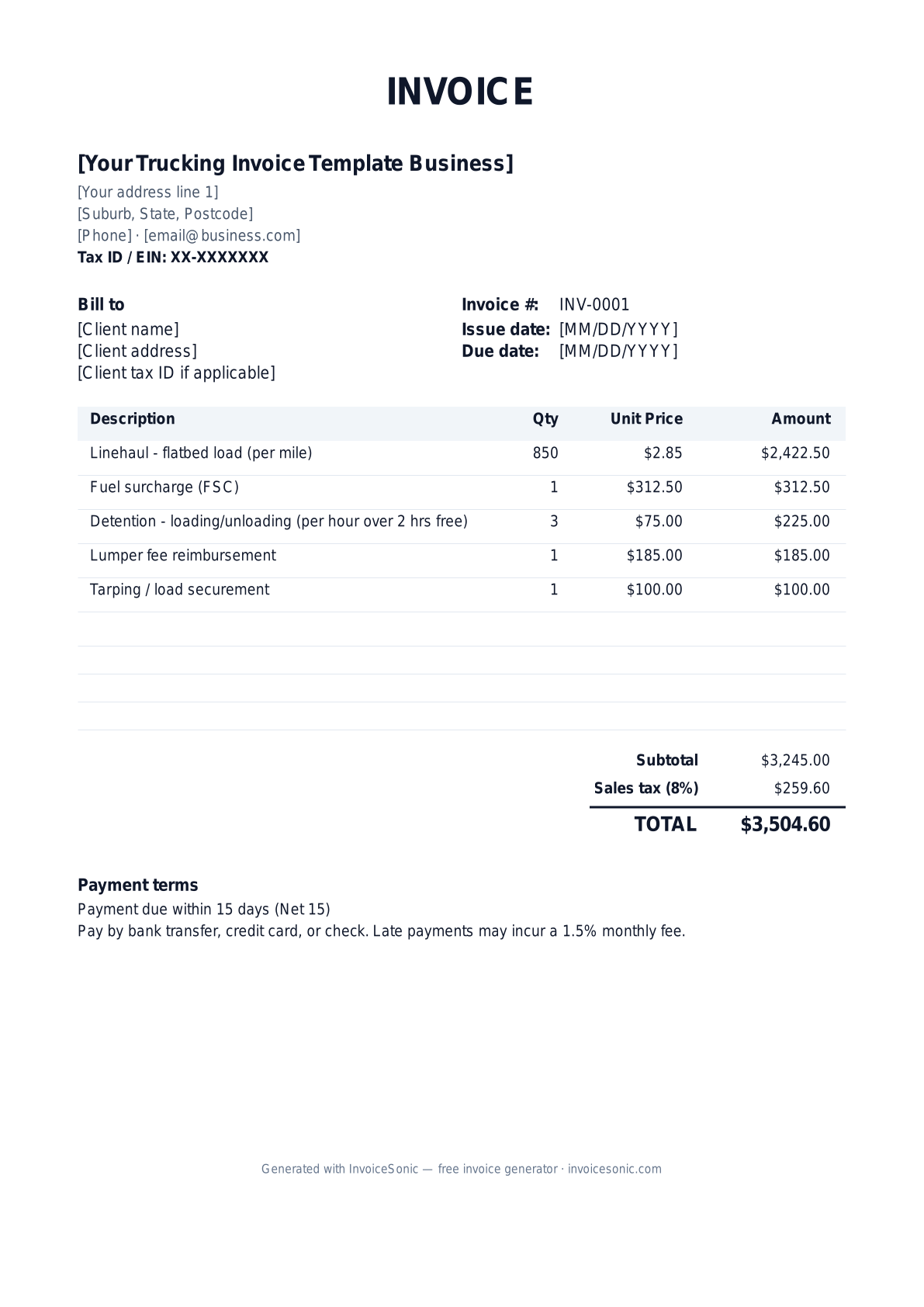
Try the live generator →What's on the trucking invoice template
| Description | Qty | Unit price | Amount |
|---|---|---|---|
| Linehaul - flatbed load (per mile) | 850 | $2.85 | $2,422.50 |
| Fuel surcharge (FSC) | 1 | $312.50 | $312.50 |
| Detention - loading/unloading (per hour over 2 hrs free) | 3 | $75.00 | $225.00 |
| Lumper fee reimbursement | 1 | $185.00 | $185.00 |
| Tarping / load securement | 1 | $100.00 | $100.00 |
| Subtotal | $3,245.00 | ||
| Sales tax (8%) | $259.60 | ||
| Total | $3,504.60 | ||
Example figures — every field is editable in the download.
Who uses this template
- ✓Owner-operator truck drivers
- ✓Small fleet carriers
- ✓Freight brokers billing shippers
- ✓Hotshot haulers
- ✓Box truck and local delivery operators
What to include
- ✓BOL (Bill of Lading) number and PRO number
- ✓Origin and destination with pickup/delivery dates
- ✓Loaded miles and rate per mile
- ✓Fuel surcharge calculation
- ✓Accessorials (detention, lumper, tarp, layover)
- ✓Carrier MC/DOT number and EIN
- ✓Net 30 or quick-pay terms
Available in 5 formats
Word (.docx)
Fully editable in Microsoft Word, Google Docs, Apple Pages and LibreOffice — best for quick text edits.
Excel (.xlsx)
Line totals, subtotal and tax calculate automatically — best if you want the math done for you.
A clean, print-ready, fixed layout — best for emailing a finished invoice to a client.
Google Docs / Sheets
Open in your browser, then File → Make a copy to edit and share with your team.
Invoicing tips for trucking
- ✓ Always reference the load's BOL and PRO number so brokers can match your invoice to their dispatch records and pay faster.
- ✓ Itemize the fuel surcharge separately from linehaul - most broker rate cons require it broken out.
- ✓ Attach the signed BOL and any lumper receipts; missing proof of delivery is the #1 reason trucking invoices get held.
- ✓ Note your factoring company's remit-to address if you factor, so the broker pays the right party.
- ✓ Bill detention in hourly increments and cite the free-time terms from the rate confirmation to avoid disputes.
Trucking invoice FAQ
What is a fuel surcharge and how do I show it on a trucking invoice?
A fuel surcharge (FSC) compensates for diesel price swings above a base rate. List it as its own line item, separate from your per-mile linehaul, since brokers and shippers reconcile it against the rate confirmation.
Do I charge sales tax on freight hauling?
Interstate freight transportation is generally not subject to state sales tax, but rules vary for intrastate hauls and accessorial services. Confirm with your state's department of revenue or your accountant.
What payment terms are standard in trucking?
Net 30 is the broker norm, but many carriers use a factoring company or quick-pay (2-3 day payment for a small fee) to keep cash flowing between loads.
What documents should I send with my trucking invoice?
Include the signed Bill of Lading (proof of delivery), the rate confirmation, and receipts for any lumper or accessorial charges. Most brokers won't process payment without the signed BOL.
Related invoice templates
Prefer a specific format? Word invoice template · Excel invoice template · PDF invoice template · Google Docs invoice template · All invoice templates
A practical guide to trucking billing
Use the template as a starting layout, then replace its example information with the actual agreed work. The details below help you decide what to enter and what to check before sending.
Agree what this invoice covers
Match the invoice to the agreed load rate and separately authorised accessorial charges. State the units for waiting time, distance or extra stops. Use the rate confirmation or customer agreement to determine what is included in the base transport price.
Give the payer enough context
Include the load number, pickup and delivery dates, route and customer or broker reference. Check the legal billing name and delivery contact against the accepted work. Keep the agreed rate, proof of delivery and approval or supporting records for additional charges available to resolve questions. An invoice records the charge; it does not replace the underlying approval or supporting documents.
Worked trucking invoice example
The base load is charged once. Detention and the additional stop are separate, traceable items. These figures are illustrative, not freight-rate guidance; use the actual rate agreement and required evidence.
| Description | Quantity | Rate | Amount |
|---|---|---|---|
| Transport — load reference LD104 | 1 | 900.00 | 900.00 |
| Approved detention hours | 2 | 55.00 | 110.00 |
| Agreed additional stop | 1 | 65.00 | 65.00 |
| Example subtotal | 1,075.00 | ||
Avoid this billing mistake
Omitting the load number or proof of delivery can leave an otherwise correct invoice unmatched. Check the payer’s submission requirements before sending, including whether a portal or specific email address is required.
Follow up on the right record
If the broker reports missing paperwork, resend the relevant evidence against the original invoice number. Keep the payment record distinct from delivery completion: a delivered load does not mean the associated invoice is paid.
Before you send
- Match the line items and quantities to the accepted scope and approved changes.
- Check the invoice number, issue date, explicit due date and the load number, pickup and delivery dates, route and customer or broker reference.
- Apply only the tax treatment relevant to your business and location; check current local requirements if unsure.
- Keep earlier billing separate from actual payments. Verify the outstanding amount and payment instructions.
The free browser tool prepares the document. Saving customers, sending tracked invoices and managing reminders require an account and are subject to plan limits. Payment status needs accurate payment records; an invoice view alone does not confirm payment.