For sole-trader and small plumbing businesses · VAT fields on invoices
Job Management Software for Plumbers
Every call-out, quote and visit on one job.
Job management software for plumbers should answer three questions quickly: where is the job, what did you quote, and has it been billed? Create the job from the first call with the customer, property and fault. Quote the repair, book the visit, then raise the invoice from the same record, with your VAT number and rate when you are VAT-registered.
Already have an account? Open Jobs
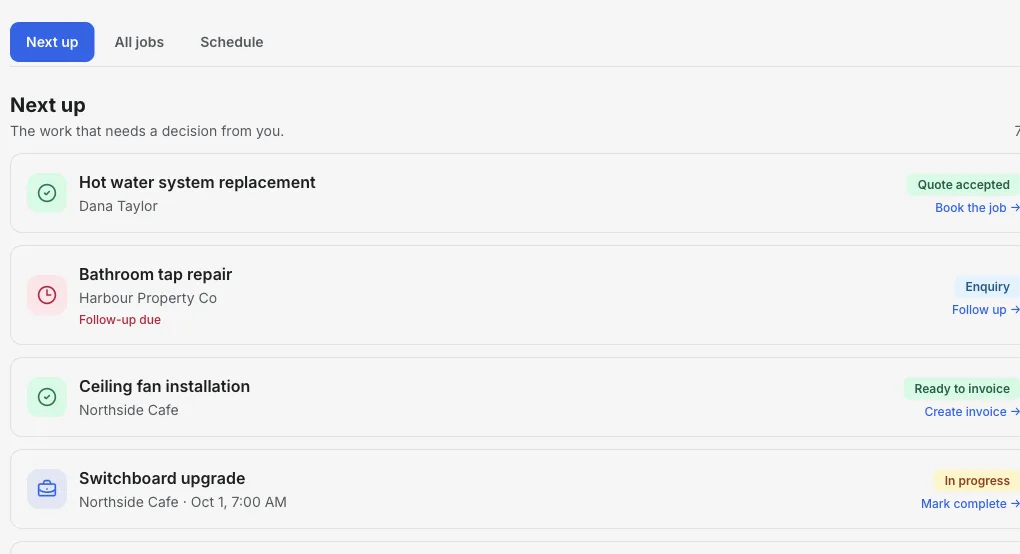
Inside the Jobs workspace
See the leak to quote and the job to bill.
Next up puts follow-ups that are due, booked visits and finished work waiting for an invoice in one short list. Open a job to see the customer, address, notes and linked quote.
- 01
Log the call
Add the job name and customer. The address, fault and access notes can follow.
- 02
Quote and book
Send a quote the customer can accept online, then set the visit time on the job.
- 03
Bill the finished work
Create the invoice from the job so the customer and site are already attached.
Product walkthrough
Watch a job go from enquiry to ready-to-invoice
This 18-second recording uses fictional sample data: a job is added, given a visit time and surfaced when it is ready to invoice.
Demo data · no sound · play when you are ready
Built around the plumbing job
One record per call-out
Keep the customer, property, reported fault and access notes on the job, so you are not searching messages before the visit.
Quotes customers can accept
Send a quote linked to the job. The customer can accept or decline it from the link, and the response is recorded.
Book the visit
Set the appointment on the job and check the day-by-day Schedule view before you leave.
Status at a glance
Move each job through enquiry, quoted, scheduled, in progress, completed and invoiced.
VAT invoices
Add your VAT number and apply VAT when you are registered. Itemise labour, parts and call-out charges clearly.
Know what is owed
Track each invoice through sent, viewed and paid, and record how the customer paid.
How it works
-
1
Create the job
Enter the customer and job name from the first call. Add the property and fault details.
-
2
Quote and schedule
Send the quote, and once it is accepted, book the visit on the same job.
-
3
Invoice and close
After the work, create the invoice from the job and track the balance until it is paid.
From dripping radiator valve to paid invoice
A typical small plumbing job, kept on one record from the first call.
- Call
- Record the customer, address and leaking radiator valve as a new job.
- Quote
- Quote the valve replacement and drain-down. The customer accepts from the link.
- Visit
- Book Thursday at 9:00 and add the parking note to the job.
- Invoice
- Invoice labour and parts, add VAT if registered, and track the payment.
Takeaway: InvoiceSonic does not issue Gas Safe or other compliance certificates. Keep those in the system your registration body requires.
How to choose job management software for plumbers
Most plumbing software round-ups rank tools built for firms with a dispatcher. If you work alone or with an apprentice, judge each option on the work you actually do in a week.
Call-outs you can log in seconds
Emergency calls arrive while you are under a sink. If adding a job takes more than a customer name and an address, it will not get used.
Quotes the customer can accept without a phone call
Boiler swaps and bathroom work are quoted first. Online acceptance saves a chasing call and gives you a recorded yes before you order parts.
VAT handled on the invoice
If you are VAT-registered, the invoice needs your VAT number and the right rate. If you are not registered, it should not add VAT at all.
Pricing that suits one person
Some tools charge per user, others by jobs per month, others a flat fee. Work out what you would pay at your real job volume, not the headline price.
Certificates kept in the right place
Gas Safe records and other certificates usually live in dedicated certification software. Use job management software for the job, quote and invoice, and keep certificates where your scheme expects them.
InvoiceSonic vs ServiceM8, Tradify and Fergus
An honest comparison for a one- or two-person plumbing business. The other three are strong choices if you run a team.
| InvoiceSonic | ServiceM8 | Tradify | Fergus | |
|---|---|---|---|---|
| How you pay | Free plan; one flat Pro price, not per user | Free plan (30 jobs a month); paid plans priced by jobs per month | Per user, per month | Per account, plus timesheet users |
| Quotes customers accept online | Yes | Yes | Yes | Yes |
| Job scheduling | Yes, day-by-day schedule | Yes | Yes | Yes |
| Staff accounts and dispatch | No (assignee label only) | Paid plans | Yes | Yes |
| Online booking for customers | No | Yes | Yes | Not listed |
| Customer portal | Share links for each quote and invoice | Yes | Yes | Yes |
| Timesheets | No | Not listed | Pro plan and above | Yes |
| Best for | Sole traders who want quotes, a simple diary and invoices | Small teams that want booking and dispatch, priced by job volume | Trade teams that track each person's time | Trade businesses running staff and timesheets |
Choose InvoiceSonic if you mainly need call-outs, quotes, a simple diary and VAT invoices for yourself. Choose ServiceM8, Tradify or Fergus if you dispatch engineers, want customers to book online or need timesheets.
Competitor details are from each vendor's public pricing page for your country, checked 2–3 October 2026. Plans and prices change, so confirm on the vendor's site before you decide.
Put the next call-out on a job
Add the customer and the fault, then quote and book it.
Start with JobsFrequently asked questions
Is this job management software suitable for a one-person plumbing business?
Yes. It is built for sole traders and small firms: a job needs only a name and a customer to start, and the quote, appointment and invoice attach to it as the work progresses.
Does it handle VAT?
Yes. Set your business country to the United Kingdom to add your VAT number and apply VAT on invoices when you are VAT-registered.
Can customers accept a quote online?
Yes. A shared quote has accept and decline buttons, and the customer's response is recorded on the quote.
Can I dispatch engineers or issue gas safety certificates?
No. Jobs can store an assignee label but has no staff accounts or dispatch notifications, and it does not produce Gas Safe records or other certificates.
Related tools & guides
Job management software · Scheduling software for plumbers · Plumbing invoicing software · Job management for tradesmen