For solo handymen and small home-repair businesses
Handyman Business Software
Lots of small jobs. One place to keep them straight.
Handyman business software has to keep up with volume: a sticking door, three shelves to hang, a fence board to replace, each with its own address, price and visit. Add each one as a job in seconds, quote it, book it on the day it fits, and invoice the labor and materials when it is done.
Already have an account? Open Jobs
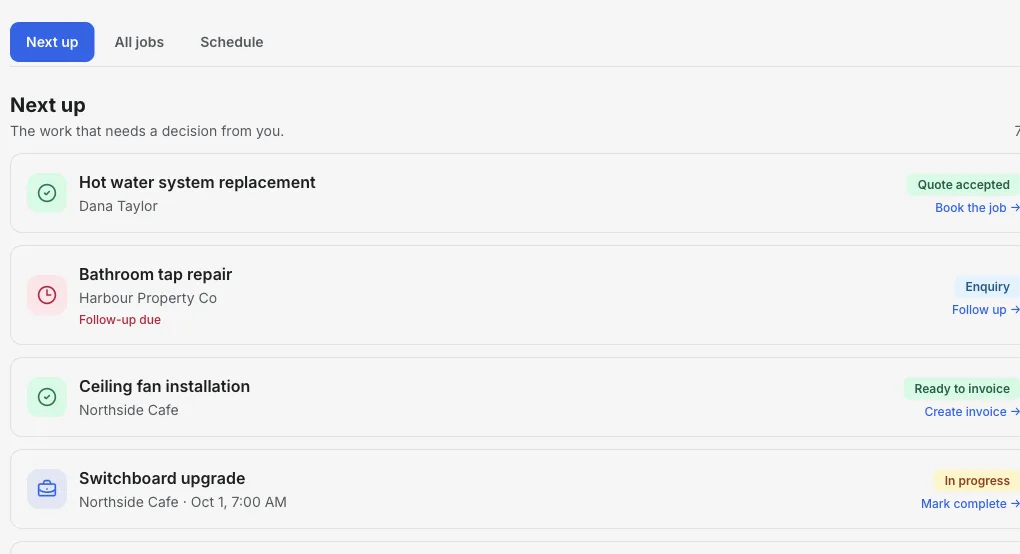
Inside the Jobs workspace
Today's jobs and the ones still waiting on you.
Next up shows the quotes to follow up, today's booked visits and finished jobs that still need an invoice, so nothing small slips through.
- 01
Add jobs fast
Only a job name and client are required. Typing a client name finds or creates them.
- 02
Quote small work
Send a quote the client can accept from the link, without a phone call.
- 03
Invoice on the spot
Create the invoice from the job before you leave the driveway.
Product walkthrough
See a job added, booked and ready to bill
This 18-second recording uses fictional sample data: a job is added, given a visit time and surfaced when it is ready to invoice.
Demo data · no sound · play when you are ready
Made for a day of small jobs
One record per small job
Keep the client, address and notes on the job, even for a 30-minute fix.
Saved services
Save common items such as hourly labor, trip charge or TV mounting as reusable line items for quotes and invoices.
Quotes clients can accept
Send a quote from the job; the client can accept or decline online.
Day-by-day schedule
Book visits and see the day's run in order before you load the truck.
Labor and materials on the invoice
Itemize hours, parts and trip charges so the client sees exactly what they are paying for.
Get paid your way
Show Venmo, Zelle, Cash App, PayPal, bank transfer or your card payment link on the invoice.
How it works
-
1
Add the job
Enter the client and a short job name from the call or text.
-
2
Quote and book
Send the quote, then set the visit when the client accepts.
-
3
Invoice and track
Create the invoice from the job and follow it until it is paid.
A Saturday with three small jobs
How a handyman day stays organized without a notebook.
- 9:00 am
- Rehang a sticking door. Open the job to check the address and the quoted price.
- 11:30 am
- Mount a TV and hide the cables. The client accepted the quote online on Thursday.
- 2:00 pm
- Replace a rotten fence board. Add the extra board you needed to the invoice.
Takeaway: Three jobs, three invoices, all created from records you already had.
Put your next small job in one place
Add the client and the fix, then quote and book it.
Start with JobsFrequently asked questions
Is this handyman business software suitable for a one-person business?
Yes. It is built for solo operators: add a job with two fields, quote it, schedule it and invoice it from the same record.
What payment methods can I show on invoices?
You can add Venmo, Zelle, Cash App, PayPal, bank transfer or your own card payment link. InvoiceSonic does not take a percentage of payments made outside the app.
Can clients book themselves online?
Not currently. You add jobs and appointments yourself; clients receive quotes and invoices by link.
Does it handle licensing, permits or insurance records?
No. Keep those in the system your state or insurer requires. InvoiceSonic covers jobs, quotes, scheduling and invoicing.
Related tools & guides
Job management software · Invoicing software for handymen · Job scheduling software · Quoting software