For owner-operators and small HVAC shops
HVAC Scheduling Software
Book the service call. Keep the unit notes with it.
HVAC scheduling software for an owner-operator or a two-tech shop should do two things well: show the day's calls and put the right job details in front of you. Book each service call or install on the job, keep the unit model, filter size and site notes there, quote the repair and invoice parts and labor when you are done.
Already have an account? Open Jobs
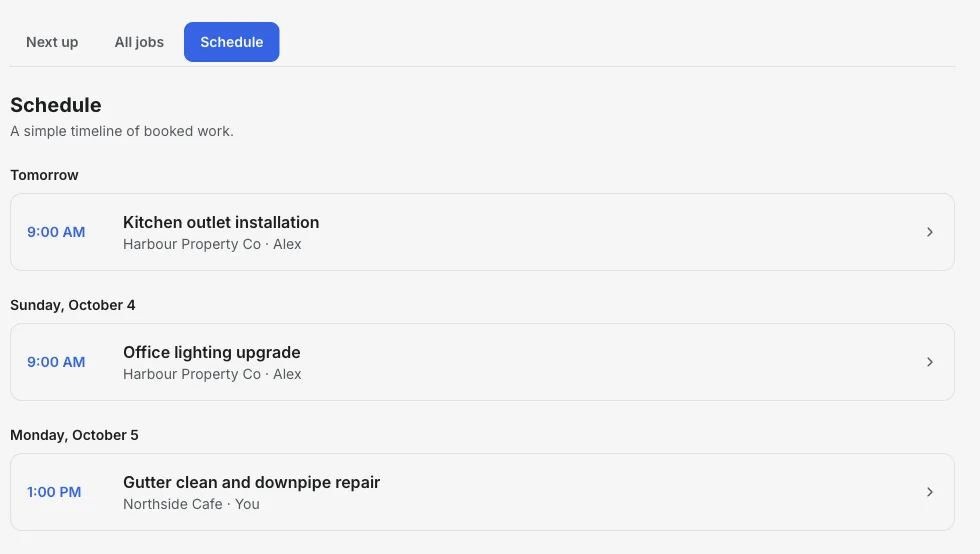
Inside the Schedule view
Today's calls, each with the job behind it.
The Schedule view groups appointments by day. Open a call to see the customer, address, unit notes and any quote already sent.
- 01
Book the call
Set the time on the job and add the reported problem.
- 02
Know the unit
Keep model, serial and filter size in the job notes.
- 03
Quote, then bill
Quote the repair or replacement and invoice it from the same job.
Product walkthrough
See a call booked and ready to invoice
This 18-second recording uses fictional sample data: a job is added, given a visit time and surfaced when it is ready to invoice.
Demo data · no sound · play when you are ready
Service calls with the details attached
Day-by-day schedule
See service calls, tune-ups and installs grouped by day.
Equipment notes on the job
Record the unit model, serial number, filter size and access notes where you will see them on site.
Quote repairs and replacements
Send a quote the customer can accept online, linked to the job.
Saved services
Save diagnostic fees, common parts and labor rates as reusable line items.
Follow-up dates
Set a follow-up on a job, for example a seasonal tune-up reminder, and it appears in Next up when due.
Parts and labor invoices
Itemize the diagnostic, parts and labor and track the invoice until it is paid.
How it works
-
1
Book the service call
Create the job with the customer, address and reported issue, and set the appointment.
-
2
Diagnose and quote
Add your findings to the notes and send the repair quote.
-
3
Fix and invoice
Complete the work and create the invoice from the job.
A no-cool call in July
One service call from booking to payment.
- Booking
- Customer reports no cooling. Book 8:00 am and note the condenser location.
- Diagnosis
- Failed capacitor. Add the unit model and serial to the job notes.
- Quote
- Quote the capacitor replacement; the customer accepts on the spot from the link.
- Invoice
- Invoice the diagnostic, part and labor, and set a fall tune-up follow-up.
Takeaway: The next time this customer calls, the unit details are already on file.
How to choose HVAC scheduling software
HVAC software ranges from simple scheduling to full dispatch platforms priced per technician. Start with how many people you schedule, then check the details that matter in a busy season.
Handles the seasonal rush
The first heatwave or cold snap doubles your calls. You need to add a service call in seconds and see the day at a glance.
Equipment details on the job
Model, serial number and filter size should be on the job you open on site, so the next visit starts with the history.
Maintenance agreements
Check how a tool handles recurring visits and billing. Some create repeat visits automatically; others, including InvoiceSonic, bill the agreement on a schedule and book visits individually.
Dispatch and price per technician
Dispatch boards and GPS matter with several trucks. For one or two technicians, per-technician pricing is often the biggest cost difference.
InvoiceSonic vs Jobber, Housecall Pro and ServiceTitan
An honest comparison for owner-operators and small HVAC shops. The others are built for larger teams.
| InvoiceSonic | Jobber | Housecall Pro | ServiceTitan | |
|---|---|---|---|---|
| Starting price | Free plan; Pro US$14.99 a month | US$29 a month billed annually (US$49 monthly), 1 user | US$59 a month billed annually (US$79 monthly), 1 user | Quote on request, priced per technician |
| Estimates customers approve online | Yes | Yes | Yes | Estimates included |
| Scheduling | Yes, day-by-day schedule | Yes | Yes | Yes |
| Dispatch and team accounts | No (assignee label only) | Yes; extra users US$29 a month each | Yes | Yes |
| Online booking | No | Yes | Yes | Call booking |
| Customer self-service | Share links for each estimate and invoice | Client hub | Customers book and pay online | Customer portal |
| Best for | Owner-operators who estimate, book and invoice their own work | Home-service teams that want online booking and a client hub | Teams that want booking, dispatch and payments together | Larger contractors with many technicians |
Choose InvoiceSonic for service calls, estimates, a simple schedule and parts-and-labor invoices when you run the calls yourself. Choose Jobber or Housecall Pro for small teams with dispatch, and ServiceTitan for larger contractors.
Competitor details are from each vendor's public pricing page for your country, checked 2–3 October 2026. Plans and prices change, so confirm on the vendor's site before you decide.
Book your next service call
Add the customer and the problem, then schedule the visit.
Start with JobsFrequently asked questions
Does it include a dispatch board or GPS tracking?
No. Jobs is built for owner-operators and very small shops: a day-by-day schedule with an assignee label, without dispatch, GPS or technician apps.
Can it manage maintenance agreements?
On Pro, recurring invoices can bill an agreement on a schedule. Visits are booked individually; automatic recurring visits are not available yet.
Is there a price book?
You can save services and parts as reusable line items for quotes and invoices. There is no supplier-linked price book.
Can customers accept quotes online?
Yes. A shared quote has accept and decline buttons, and the response is recorded.
Related tools & guides
Job scheduling software · Job management software · Quoting software · Scheduling software for plumbers