For owner-operators and small hauling businesses
Junk Removal Software
Quote the load, book the pickup, bill the haul.
Junk removal software for a one- or two-truck operation should turn a photo-and-text enquiry into a booked pickup quickly. Log the request with the address and item list, quote by load size or item, book the haul on the day that fits and invoice the actual load once the truck is empty.
Already have an account? Open Jobs
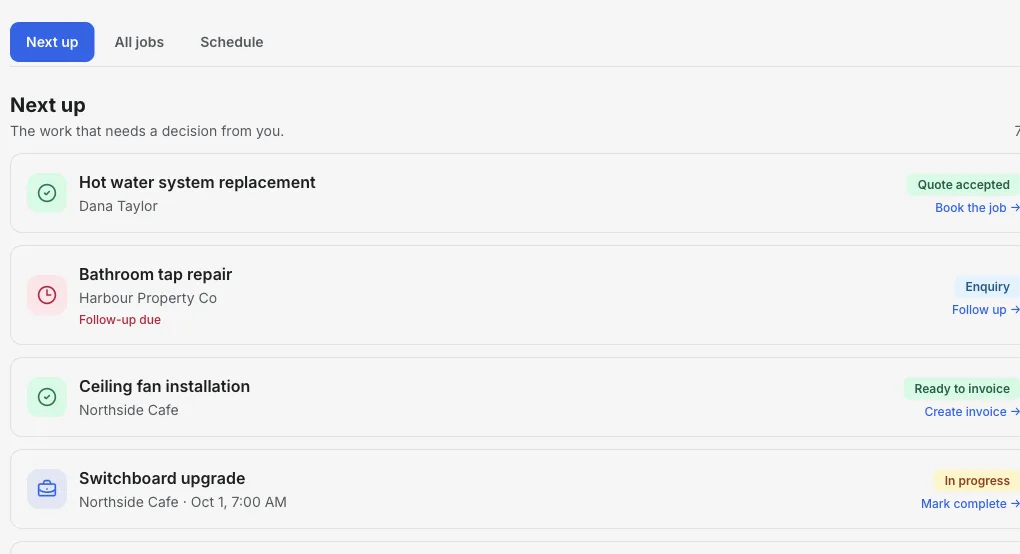
Inside the Jobs workspace
Pickups booked, quotes waiting, hauls to bill.
Next up shows quotes that need a reply, pickups booked for the coming days and finished hauls that still need an invoice.
- 01
Log the request
Customer and job name first; add the address and item list.
- 02
Quote by load
Send a quote the customer can accept online.
- 03
Bill the real load
Invoice what you actually hauled, with disposal fees itemized.
Product walkthrough
See a job added, booked and ready to bill
This 18-second recording uses fictional sample data: a job is added, given a visit time and surfaced when it is ready to invoice.
Demo data · no sound · play when you are ready
From enquiry to empty truck
Requests become jobs
Every pickup request gets a job with the address, item list and access notes such as stairs or parking.
Saved load prices
Save quarter, half and full load prices, plus mattress or appliance fees, as reusable line items.
Quotes customers can accept
Send the quote from the job; the customer accepts or declines online.
Pickups by day
Book hauls and see the week grouped by day in the Schedule view.
Adjust on site
Load bigger than quoted? Invoice the actual load and note the change on the job.
Get paid before you leave
Show Venmo, Zelle, Cash App, PayPal or your card payment link on the invoice.
How it works
-
1
Log the pickup request
Create the job with the customer, address and what needs to go.
-
2
Quote and book
Send a load-based quote and book the pickup once accepted.
-
3
Haul and invoice
Invoice the actual load and disposal fees from the job.
A garage cleanout that grew
One job from text enquiry to paid invoice.
- Enquiry
- Customer texts photos of a garage cleanout. Log the job and address.
- Quote
- Quote a half load plus one mattress fee. The customer accepts online.
- Pickup
- Book Friday at 1:00 pm. On site it is closer to three-quarters of a load.
- Invoice
- Invoice the three-quarter load and mattress fee, and note the change on the job.
Takeaway: The quote sets expectations; the invoice bills what you actually hauled.
Frequently asked questions
Can customers book pickups online?
Not currently. You add jobs and appointments yourself; customers receive quotes and invoices by link.
Can I price by load size?
Yes. Save load sizes and item fees as reusable line items and use them on quotes and invoices.
Does it handle dump receipts or route planning?
No. Add disposal fees to the invoice as line items yourself. Route optimization and dispatch are not part of Jobs.
Can I try it before paying?
You can create an account and open Jobs. Free-plan invoice limits apply when you create invoices; see the pricing page for current limits.
Related tools & guides
Job management software · Job scheduling software · Quoting software · Handyman business software