For solo landscapers and small landscaping businesses
Landscaping Scheduling Software
Plan the week's installs and cleanups around the job, not a loose calendar.
Landscaping scheduling software should show what is booked each day and what each visit is for. Put the appointment on the job, with the property, gate code, scope and quote attached. When rain moves the week, reschedule the job; when the work is done, invoice it from the same record.
Already have an account? Open Jobs
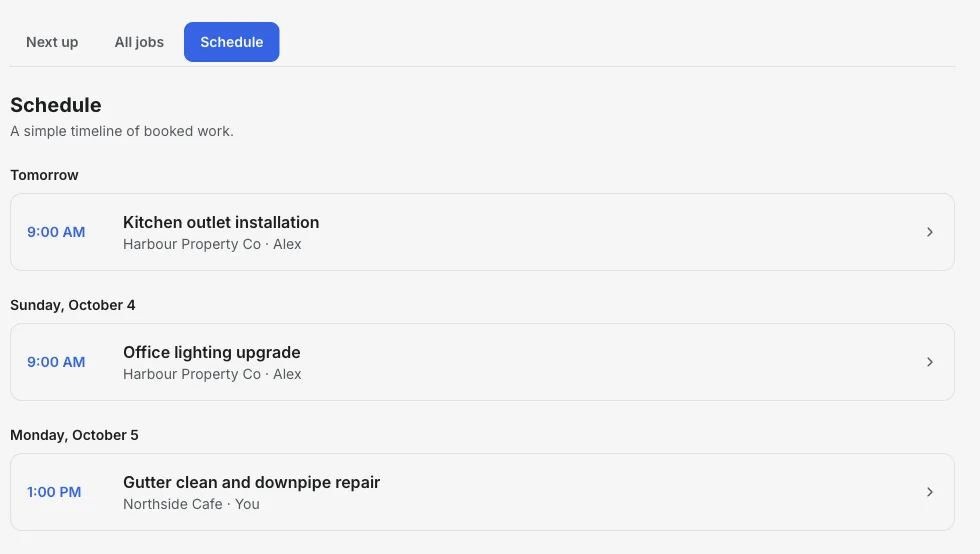
Inside the Schedule view
Each booked visit opens the job behind it.
The Schedule view groups appointments by day. Open any visit to see the client, property, notes and the quote you agreed.
- 01
Book the job
Set the start time, end time and assignee label on the job.
- 02
Scan the week
See upcoming visits grouped by day with the client and time.
- 03
Move it for weather
Change the appointment on the job; the notes and quote stay with it.
Product walkthrough
See a visit booked and scheduled
This 18-second recording uses fictional sample data: a job is added, given a visit time and surfaced when it is ready to invoice.
Demo data · no sound · play when you are ready
Scheduling that knows what the visit is for
Day-by-day schedule
See installs, cleanups and quotes-to-measure grouped by day.
Site notes on the job
Keep gate codes, dogs, irrigation zones and access notes where you will see them before the visit.
Quote the install
Send a quote for plants, materials and labor; the client can accept it online.
Reschedule without retyping
Rain delay? Change the appointment on the job and everything else stays put.
Recurring invoices for maintenance plans
On Pro, recurring invoices bill a monthly maintenance agreement on schedule.
Invoice when it is done
Create the invoice from the finished job with the client already attached.
How it works
-
1
Create the job
Add the client, property and scope from the first call or site walk.
-
2
Quote and schedule
Send the quote and book the work on the day that fits.
-
3
Finish and invoice
Mark the job complete and create its invoice.
A week with a weather delay
How a small landscaping schedule absorbs a rainy day.
- Monday
- Garden bed install, quoted and accepted last week. Site notes: side gate, dog in yard.
- Tuesday
- Rain. Move Tuesday's sod job to Thursday on the job record.
- Thursday
- Lay the sod, mark the job complete and create the invoice before leaving.
Takeaway: The visit moves; the client, address, scope and price move with it.
How to choose landscaping scheduling software
The right landscaping software depends on whether your week is mostly project work or recurring maintenance routes. Decide that first, then compare.
Projects or recurring routes?
Installs and cleanups are one-off jobs. Weekly mowing is a route. Tools built for routes create repeat visits automatically; InvoiceSonic does not yet.
Weather-proof rescheduling
Rain moves half the week. Moving a job should keep its site notes, quote and client attached.
Quotes for installs
Plant, material and labor quotes that clients accept online turn site visits into booked work faster.
Crews or just you
If you schedule crews, look for team accounts and crew assignment. If it is you and a helper, a simple schedule is enough.
InvoiceSonic vs Jobber and Housecall Pro
How the options compare for a small landscaping business doing mostly project work.
| InvoiceSonic | Jobber | Housecall Pro | |
|---|---|---|---|
| Starting price | Free plan; Pro US$14.99 a month | US$29 a month billed annually (US$49 monthly), 1 user | US$59 a month billed annually (US$79 monthly), 1 user |
| Estimates customers approve online | Yes | Yes | Yes |
| Scheduling | Yes, day-by-day schedule | Yes | Yes |
| Dispatch and team accounts | No (assignee label only) | Yes; extra users US$29 a month each | Yes |
| Online booking | No | Yes | Yes |
| Customer self-service | Share links for each estimate and invoice | Client hub | Customers book and pay online |
| Best for | Owner-operators who estimate, book and invoice their own work | Home-service teams that want online booking and a client hub | Teams that want booking, dispatch and payments together |
Choose InvoiceSonic for installs, cleanups and quoted projects you run yourself. Choose Jobber or Housecall Pro if you run crews or weekly maintenance routes that need repeat visits and online booking.
Competitor details are from each vendor's public pricing page for your country, checked 2–3 October 2026. Plans and prices change, so confirm on the vendor's site before you decide.
Frequently asked questions
Can I schedule weekly mowing routes?
Not automatically. Jobs does not yet create repeating visits or optimize routes, so it suits installs, cleanups and one-off visits best. On Pro, recurring invoices can bill a maintenance plan on a schedule.
Can my crew see the schedule?
Jobs can store an assignee label, but there are no staff accounts or crew notifications yet.
Can clients accept quotes online?
Yes. A shared quote has accept and decline buttons, and the response is recorded.
Can I try it before paying?
You can create an account and open Jobs. Free-plan invoice limits apply when you create invoices; see the pricing page for current limits.
Related tools & guides
Job scheduling software · Invoicing software for landscapers · Recurring invoices · Job management software