For small builders and renovators · Deposit, progress and final invoices
Job Management Software for Builders
Small builds need a clear job record, not a project-management suite.
Job management software for builders doing small residential work and renovations should keep the site, client, quote and billing stages in one place. Record the enquiry, quote the scope, book site visits, then bill in stages with deposit, progress and final invoices that show your ABN and GST where it applies.
Already have an account? Open Jobs
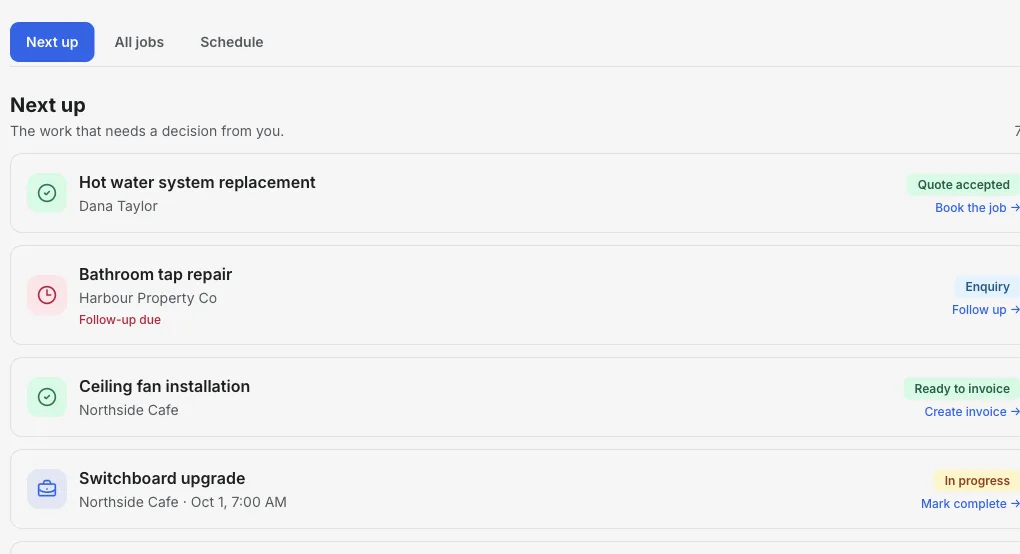
Inside the Jobs workspace
Every site, its quote and its next claim.
Next up shows the quote to follow up, the site visit coming up and the stage that is ready to bill. Open the job to see the client, address, notes and linked documents.
- 01
Record the site
Add the client and address, with access and scope notes from the first walk-through.
- 02
Quote the scope
Send a quote the client can accept online, linked to the job.
- 03
Bill in stages
Raise deposit, progress and final invoices as the work moves forward.
Product walkthrough
Watch a job move through the workspace
This 18-second recording uses fictional sample data: a job is added, given a visit time and surfaced when it is ready to invoice.
Demo data · no sound · play when you are ready
From site visit to final claim
Site and client together
Keep the property, client contact and site notes on one job record.
Quotes clients can accept
Send the quote from the job; the client's accept or decline response is recorded.
Book site visits
Set appointments for measure-ups, inspections and start dates, and review them by day.
Deposit, progress and final invoices
Choose the billing stage on each invoice so the client can see what the claim covers.
ABN and GST
Show your ABN and apply GST when registered. Add PayID or bank details for payment.
See what is outstanding
Track every claim through sent, viewed and paid, and record confirmed payments.
How it works
-
1
Log the enquiry
Create the job with the client and site address, plus notes from the first visit.
-
2
Quote and book
Send the quote, then book the measure-up or start date on the job.
-
3
Claim as you go
Issue a deposit invoice, progress claims at agreed stages and a final invoice at handover.
A bathroom renovation in four claims
How staged billing stays connected to the job.
- Quote
- Quote the strip-out, waterproofing, tiling and fit-off. The client accepts online.
- Deposit
- Issue the deposit invoice agreed in your contract before ordering materials.
- Progress
- Claim the next stage when waterproofing and tiling are complete.
- Final
- Invoice the balance at handover, including approved variations.
Takeaway: Progress claims under a building contract can carry state-specific requirements. InvoiceSonic prepares the invoice; check your contract and your state's rules.
Put the next build on a job
Add the client and site, then quote and schedule the work.
Start with JobsFrequently asked questions
Is this construction project management software?
No. It is a job, quote and invoicing workflow for small builders and renovators. It has no Gantt charts, subcontractor portals, estimating take-offs or site diaries.
Can I invoice in stages?
Yes. Each invoice can be marked as a deposit, progress or final invoice so the client can see which stage it covers.
Does it handle ABN and GST?
Yes. Invoices show your ABN, and you can apply GST when your business is registered and the supply is taxable.
Can my subcontractors log in?
Not currently. Jobs can store an assignee label, but there are no staff or subcontractor accounts.
Related tools & guides
Job management software · Progress claims in Australia · Construction invoicing software · Job management for tradies