Need to reuse this template for the next job?
Invoice deposits, completed stages and final balances with clear project references and supporting job files.
Explore construction invoicing →Free Construction Invoice Template
A free, professional construction invoice template for Australian building and construction businesses. Download as Word, Excel, or PDF — formatted for progress claims, lump-sum contracts, and variations.
Prefer to fill it in online? Use the free invoice tool ↓ Jump to Word, Excel and PDF downloads ↓Create a construction invoice online
Use the same free builder as our homepage to enter your details, check totals and preview the invoice. Start without an account; downloads follow the free-tool limits. Prefer an editable file? The Word, Excel and PDF options are below.
Create your invoice online
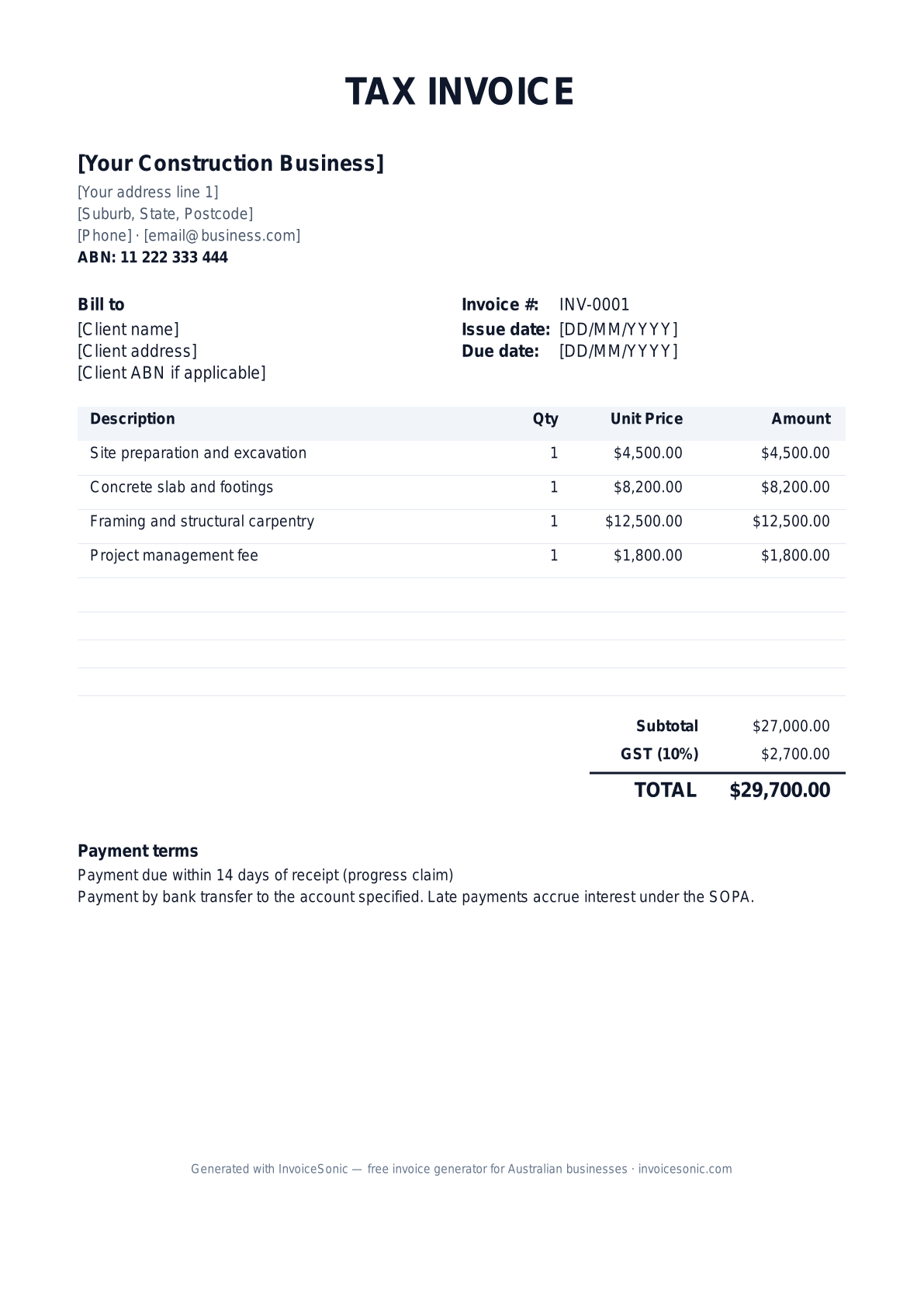
Preview of the construction invoice template — download editable Word, Excel or PDF below.
Prefer the online builder? It is right here
Enter your details, itemise the work and review the calculated totals in the tool above. Create an account when you want to save customers, send tracked invoices and manage reminders.
Try the live generator →Who uses this template
- ✓Licensed builders and construction companies
- ✓Civil and infrastructure contractors
- ✓Renovation and extension specialists
- ✓Project management and construction supervision
- ✓Subcontractors invoicing head builders
What to include on your invoice
- ✓Business name, ABN, and builder licence number
- ✓Client/principal contractor name and site address
- ✓Contract or project reference number
- ✓Progress claim number (if applicable)
- ✓Itemised work completed with quantities
- ✓GST line (10%) and total amount due
- ✓Payment terms aligned with the relevant Security of Payment Act
Invoicing tips for constructions
- 1.Mark progress claims clearly with the claim number (Claim #1, #2, etc.)
- 2.Reference the underlying contract and any variations approved
- 3.Under the Security of Payment Act, payment terms are typically 15 business days (residential) or 25 days (commercial)
- 4.Include a payment schedule deadline for clients to respond with any disputes
- 5.For variations, attach the signed variation order as supporting documentation
Frequently asked questions
Is this template suitable for progress claims under the Security of Payment Act?
Yes — it includes the fields the SOPA requires: reference date, claim number, contract reference, itemised work, and amount claimed. Add the words "This is a payment claim made under the Building and Construction Industry Security of Payment Act" if you want to invoke the act.
Do construction invoices need to include the contract reference?
Best practice is to reference the underlying contract, variation order, or purchase order. It speeds up payment by helping the principal's accounts team match the invoice quickly.
What payment terms apply under the SOPA?
For residential construction contracts: 10 business days. For commercial: 25 business days unless otherwise specified. Most builders use 14 days as a practical default.
Should I include retentions on the invoice?
If your contract specifies retentions (typically 5-10%), show the retention amount as a deduction and the net payable. Make the retention release schedule clear.
More free templates
A practical guide to construction billing
Use the template as a starting layout, then replace its example information with the actual agreed work. The details below help you decide what to enter and what to check before sending.
Agree what this invoice covers
Break the agreed project price into recognisable stages before work starts. Name what each stage covers and what makes it complete. A deposit request, a progress invoice and a final invoice serve different purposes; do not resend the full contract value as the amount due at every stage.
Give the payer enough context
Include the project address, contract or purchase-order reference, stage name and the period of work. Check the legal billing name and delivery contact against the accepted work. Keep the accepted scope, stage approval, relevant job photos and separately approved variations available to resolve questions. An invoice records the charge; it does not replace the underlying approval or supporting documents.
Worked construction invoice example
This invoice requests one completed milestone plus an approved variation. Earlier invoices belong in the project billing history, not as new charges. If the contract value changes, document the approved revised value before calculating the unbilled remainder.
| Description | Quantity | Rate | Amount |
|---|---|---|---|
| Framing stage — agreed milestone | 1 | 4,000.00 | 4,000.00 |
| Approved additional doorway — variation V02 | 1 | 450.00 | 450.00 |
| Example subtotal | 4,450.00 | ||
Avoid this billing mistake
Subtracting an unpaid earlier invoice as though it were a received deposit hides debt. Keep three figures separate: the contract value, the amount invoiced to date and the cash received. InvoiceSonic’s previous-billing field is entered manually; it is not a project ledger or an automatic retainage calculation.
Follow up on the right record
Confirm who approves the stage and who processes payment; they may be different people. For a disputed variation, send the approval and line reference instead of simply resending the total. Projects requiring AIA payment applications, retainage schedules or construction accounting need a suitable specialist process.
Before you send
- Match the line items and quantities to the accepted scope and approved changes.
- Check the invoice number, issue date, explicit due date and the project address, contract or purchase-order reference, stage name and the period of work.
- Apply only the tax treatment relevant to your business and location; check current local requirements if unsure.
- Keep earlier billing separate from actual payments. Verify the outstanding amount and payment instructions.
The free browser tool prepares the document. Saving customers, sending tracked invoices and managing reminders require an account and are subject to plan limits. Payment status needs accurate payment records; an invoice view alone does not confirm payment.