Free Painting Invoice Template
A free, professional painting invoice template you can download as Word, Excel, PDF, or Google Docs. Pre-formatted with the surface prep, labor, paint, and square-footage charges interior and exterior painting contractors bill on every job.
Or build it online in 60 seconds
Use InvoiceSonic's free generator — auto-calculate tax, prefill your details, and email the PDF straight to your client. No formatting needed.
Try the live generator →What's on the painting invoice template
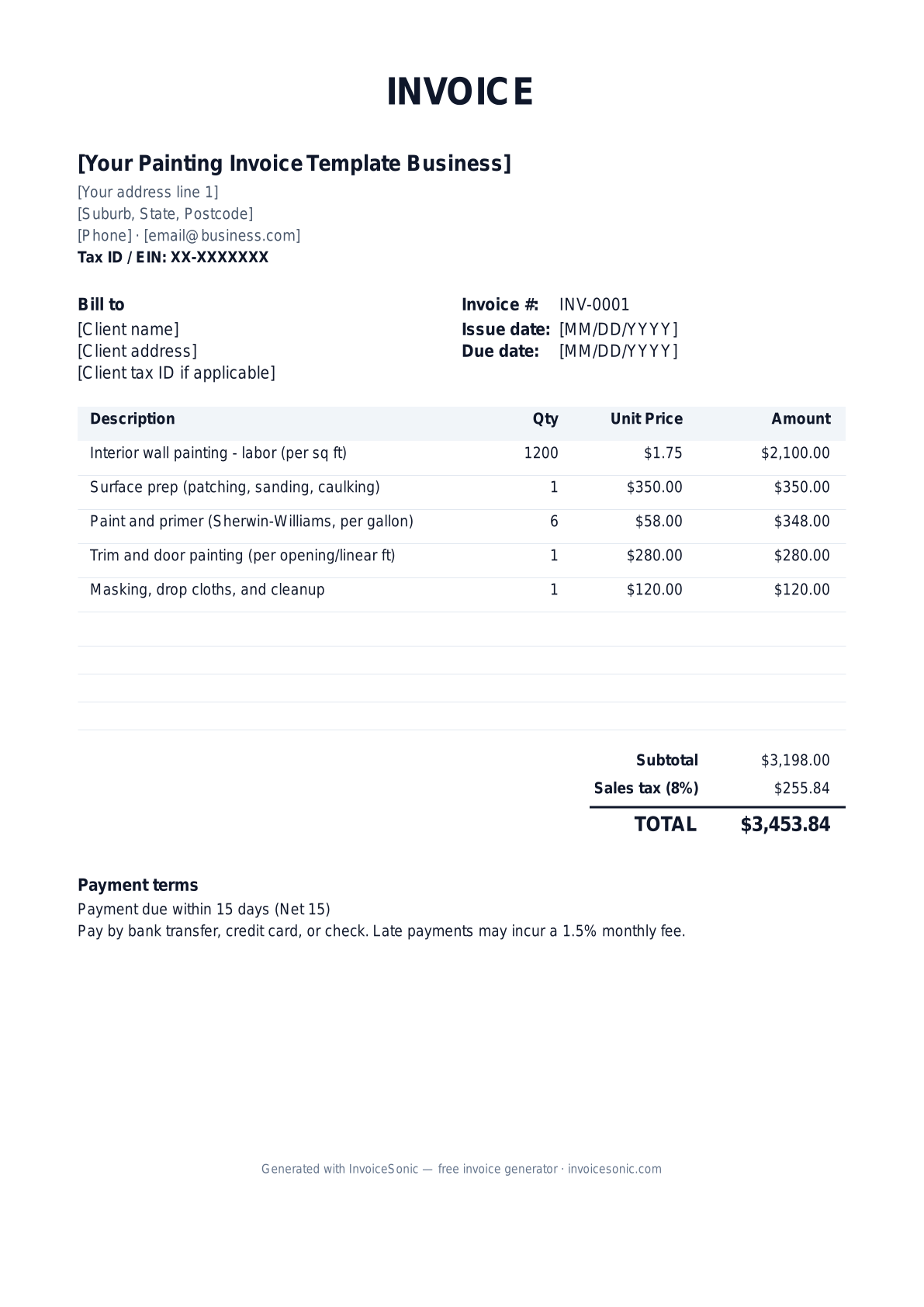
| Description | Qty | Unit price | Amount |
|---|---|---|---|
| Interior wall painting - labor (per sq ft) | 1200 | $1.75 | $2,100.00 |
| Surface prep (patching, sanding, caulking) | 1 | $350.00 | $350.00 |
| Paint and primer (Sherwin-Williams, per gallon) | 6 | $58.00 | $348.00 |
| Trim and door painting (per opening/linear ft) | 1 | $280.00 | $280.00 |
| Masking, drop cloths, and cleanup | 1 | $120.00 | $120.00 |
| Subtotal | $3,198.00 | ||
| Sales tax (8%) | $255.84 | ||
| Total | $3,453.84 | ||
Example figures — every field is editable in the download.
Who uses this template
- ✓Interior residential painters
- ✓Exterior house painting crews
- ✓Commercial and industrial painters
- ✓Cabinet refinishing specialists
- ✓Independent handyman painters
What to include
- ✓Job address and rooms/surfaces painted
- ✓Square footage or coats of coverage
- ✓Paint brand, color, sheen, and gallons used
- ✓Prep work (patching, sanding, priming)
- ✓Labor hours or per-sq-ft rate
- ✓Materials and supplies
- ✓Warranty period and Net 15/Net 30 terms
Available in 5 formats
Word (.docx)
Fully editable in Microsoft Word, Google Docs, Apple Pages and LibreOffice — best for quick text edits.
Excel (.xlsx)
Line totals, subtotal and tax calculate automatically — best if you want the math done for you.
A clean, print-ready, fixed layout — best for emailing a finished invoice to a client.
Google Docs / Sheets
Open in your browser, then File → Make a copy to edit and share with your team.
Invoicing tips for painting
- ✓ Specify paint brand, color code, sheen, and number of coats so the customer knows exactly what was applied and can color-match later.
- ✓ List prep work separately - it's often the most labor-intensive part and customers undervalue it unless it's itemized.
- ✓ Note the warranty (e.g., 2 years on labor) on the invoice to set expectations and reduce callback disputes.
- ✓ For exterior jobs, document weather-dependent timelines so delayed completion isn't blamed on you.
- ✓ Collect a deposit (often 25-33%) for material-heavy jobs and show it as a credit on the final invoice.
Painting invoice FAQ
Should I charge by square foot or by the hour for painting?
Most painters price by square foot or by the room for predictable interior/exterior work, and hourly for prep-heavy or odd jobs. The template lets you mix both as line items.
Do I charge sales tax on painting jobs?
In many states, paint and materials are taxable while labor may be exempt for real-property improvements. Rules vary widely, so confirm with your state revenue department.
How much deposit should a painter request?
A 25-33% deposit is common to cover paint and materials, with the balance due on completion. Show the deposit as a credit line so the final invoice reflects only the remaining balance.
What warranty should I put on a painting invoice?
A 1-2 year labor warranty is standard for residential repaints. State it clearly on the invoice so the customer understands what's covered and for how long.
More trade invoice templates
Templates for the trades you work alongside, plus the estimate and progress documents that come before the final invoice.
Related invoice templates
Prefer a specific format? Word invoice template · Excel invoice template · PDF invoice template · Google Docs invoice template · All invoice templates
A practical guide to painting billing
Use the template as a starting layout, then replace its example information with the actual agreed work. The details below help you decide what to enter and what to check before sending.
Agree what this invoice covers
Name the rooms, surfaces and preparation included in the price. State whether paint and consumables are included or billed separately. Record changes such as additional coats, colour changes or repair work as approved variations, not unexplained increases at completion.
Give the payer enough context
Include the property address, room or work area, quote reference and completed stage. Check the legal billing name and delivery contact against the accepted work. Keep the accepted surface schedule, agreed finishes, approved changes and completion confirmation available to resolve questions. An invoice records the charge; it does not replace the underlying approval or supporting documents.
Worked painting invoice example
The package includes its agreed materials and labour. Only the additional doors are added separately. If your quote excludes paint, show the actual supply basis rather than assuming the customer expects an extra materials charge.
| Description | Quantity | Rate | Amount |
|---|---|---|---|
| Living room preparation and painting — agreed package | 1 | 1,200.00 | 1,200.00 |
| Additional door — approved variation | 2 | 95.00 | 190.00 |
| Example subtotal | 1,390.00 | ||
Avoid this billing mistake
Charging paint twice—inside a room package and again as materials—creates an avoidable dispute. Cross-check every additional line against the inclusions and exclusions in the accepted quote.
Follow up on the right record
For staged work, label the area or milestone completed on each invoice. Keep snagging or touch-up discussions separate from the payment record, and document any agreed adjustment instead of silently editing a previously issued amount.
Before you send
- Match the line items and quantities to the accepted scope and approved changes.
- Check the invoice number, issue date, explicit due date and the property address, room or work area, quote reference and completed stage.
- Apply only the tax treatment relevant to your business and location; check current local requirements if unsure.
- Keep earlier billing separate from actual payments. Verify the outstanding amount and payment instructions.
The free browser tool prepares the document. Saving customers, sending tracked invoices and managing reminders require an account and are subject to plan limits. Payment status needs accurate payment records; an invoice view alone does not confirm payment.