Free for US businesses · No signup to start · USD and sales tax
Plumbing invoice template, filled in with a water heater job
Plumbing invoice template fields are easier to fill when you can see a real job in them. This one is already filled with a sample water heater replacement, so you can edit it here now and change the lines to match your work. Each field is explained below, including what to write and what to leave out.
Create your invoice online
Download the plumbing invoice template
US Letter size, with labor, parts and taxable items already laid out. No email needed.
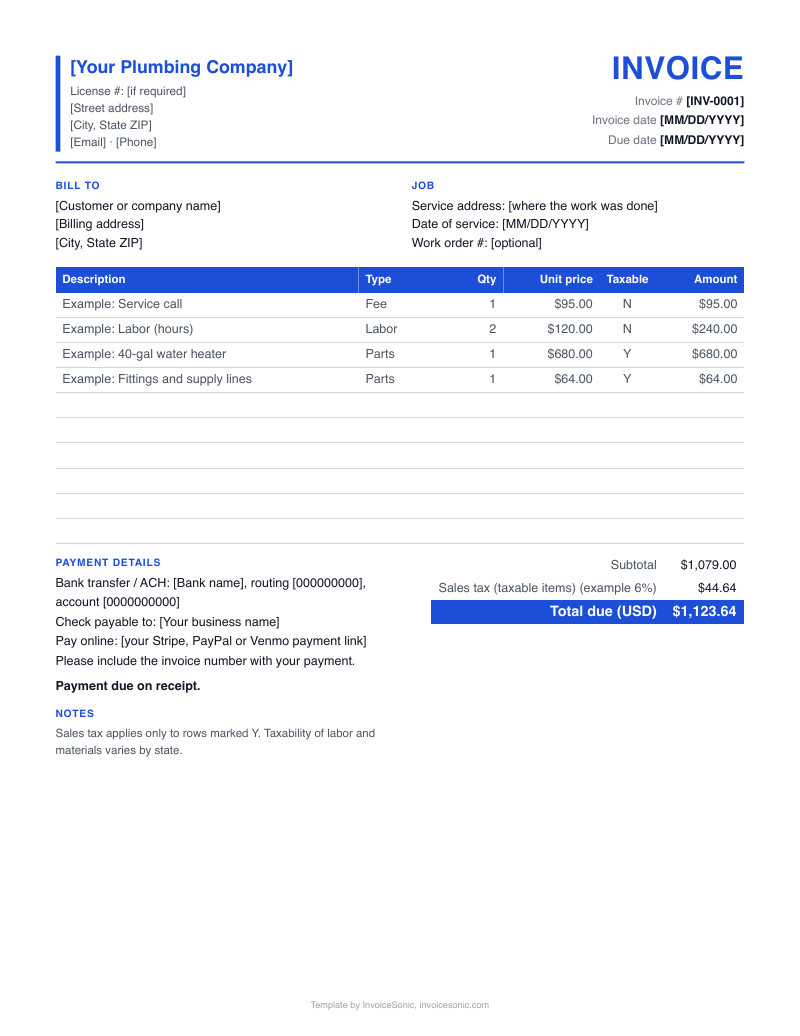
A file gets you one invoice. A free InvoiceSonic account saves your customers and line items for the next one.
Example template, filled in: water heater replacement
A 12-year-old tank has failed in a garage. The plumber supplies a new 50-gallon gas unit, adds an expansion tank, pulls a permit, removes the old heater and hauls it away. These prices are illustrations only, so replace them with your own.
| Description | Qty | Price | Amount |
|---|---|---|---|
| 50-gallon gas water heater | 1 | $1,150.00 | $1,150.00 |
| Install labor, flat rate, includes removal and haul-away | 1 | $650.00 | $650.00 |
| Expansion tank, flex connectors and fittings | 1 | $140.00 | $140.00 |
| Water heater permit fee, at cost | 1 | $85.00 | $85.00 |
| Total due | $2,025.00 | ||
- The heater is its own line. Add its brand, model and serial number in the description or notes so the customer can register the warranty.
- Removal and haul-away are named in the labor line, so nobody wonders whether they cost extra.
- The permit shows at cost, which makes clear it is not your profit. The tax rate is 0 here. Check your state and enter your own rate if tax applies.
Prices are illustrative. Use your own rates.
What fields does a plumbing invoice template need?
A plumbing invoice template needs fields for your business, the customer, the job address, the invoice number and dates, line items, totals and payment terms. Two extra fields earn their space in plumbing: a job description box and a warranty note.
- Logo and business block
- Set this once and leave it. Business name, address, phone, email, and your license number if your state or customer requires it.
- Bill to
- The person or company paying. Use the legal company name for commercial accounts so their bookkeeper can match it.
- Service address
- Keep this separate from Bill to. In the water heater job they match, but on rentals they will not.
- Invoice number
- Never reuse one. A simple sequence such as 1042, 1043 works and makes records easy to find.
- Invoice date and due date
- Write an actual date, such as November 14, rather than only upon receipt.
- Job description
- Two lines on the job: failed 40-gallon tank in garage, replaced with new 50-gallon gas unit.
- Line items
- Description, quantity, unit price and amount. One row per part or labor charge.
- Subtotal, tax and total
- Keep tax on its own row. If you use the Excel file, check the formulas still cover every row after you add lines.
- Terms and warranty note
- Payment methods, plus how long your labor warranty lasts and that the manufacturer covers the tank.
Which line item setup should you use in the template?
Use the line item setup that matches how you priced the job. A template row can carry a flat price, a labor hour or a single part, and customers read each one differently. The sample uses a flat install price with named equipment.
- Flat install with equipment split out
- Set quantity to 1 and enter the job price for labor, with the heater on its own row. Good for installs, because the warranty item is easy to find.
- Single bundled price
- One row for the whole replacement. It is short and hides your labor rate, but check your state first if tax treats parts and labor differently.
- Hours in the quantity column
- Enter hours as the quantity and your rate as the unit price. Use this when the job could not be priced up front.
- Pass-through fees at cost
- Give permits and disposal fees their own rows, and write at cost in the description if that is the case.
How do you fill out a plumbing invoice template?
Fill out a plumbing invoice template from the top down: save your business details first, then complete only the job fields for each invoice. Saving a master copy means you never retype your own name again.
- 1
Add your logo, business block and standard terms, then save that blank as your master file.
- 2
Copy the master for the job and enter the next invoice number.
- 3
Fill in Bill to and the service address, even if they are the same.
- 4
Replace the sample rows with your equipment, labor and fees. Delete rows you do not need.
- 5
Enter your tax rate, or leave it at 0 if no tax applies, then check the total by hand once.
- 6
Save the finished invoice as a PDF so the customer cannot change it, and name the file with the invoice number.
Stop rebuilding this invoice for every job
Create a free account to save your customers and line items, email invoices from your phone or computer, and see what's been paid.
Which template mistakes make plumbers lose money?
The template mistakes that lose money are stale copies, broken totals and missing equipment details. A template only saves time if the file itself stays accurate, so these errors tend to repeat on job after job.
- Editing last month's invoice
- Old numbers, dates and addresses slip through this way. Always start from the master file, never from a sent invoice.
- Rows outside the total
- Adding a row below a spreadsheet's sum range leaves that charge off the bill. Insert rows inside the table instead.
- Leaving out the serial number
- Without it, a warranty claim on the tank takes longer, and the callback lands on you unpaid. Copy it from the data plate.
- Forgetting the permit
- Permit fees are paid days before the invoice is written. A fixed row in your install template reminds you to bill them.
Plumbing invoice FAQ
What is the difference between a plumbing estimate and an invoice?
An estimate tells the customer what a job is likely to cost before you start. An invoice asks for payment after the work is done. If the scope changed, update the invoice and note why it differs from the estimate.
Should I use a Word, Excel or PDF plumbing invoice template?
Word is easiest for changing the layout and wording. Excel works best when you want totals calculated for you. PDF is the format to send, because the customer cannot edit it.
Should a water heater invoice list the model and serial number?
Yes, it is good practice. Those details help the customer register the warranty and give you a record if the unit fails. Add them to the line description or the job notes.
Should I show the permit fee as its own line?
Yes, a separate line is the clearest way to show it. The customer can see the fee was a real cost tied to the job. If you add a handling charge, do not label the line at cost.
Does a plumbing invoice template need a license number?
It should carry your license number if your state or customer requires it. Many plumbers keep a license field in the header so it appears on every invoice. Check your state rules if you are unsure.
How should I number plumbing invoices in a template?
Use a simple running sequence and never skip back. Some shops start each year with the year, such as 2026-0147. Whatever you pick, keep one sequence so your records stay easy to search.