Free for US businesses · No signup to start · USD and sales tax
Free Construction Invoice Template With Progress Billing Fields
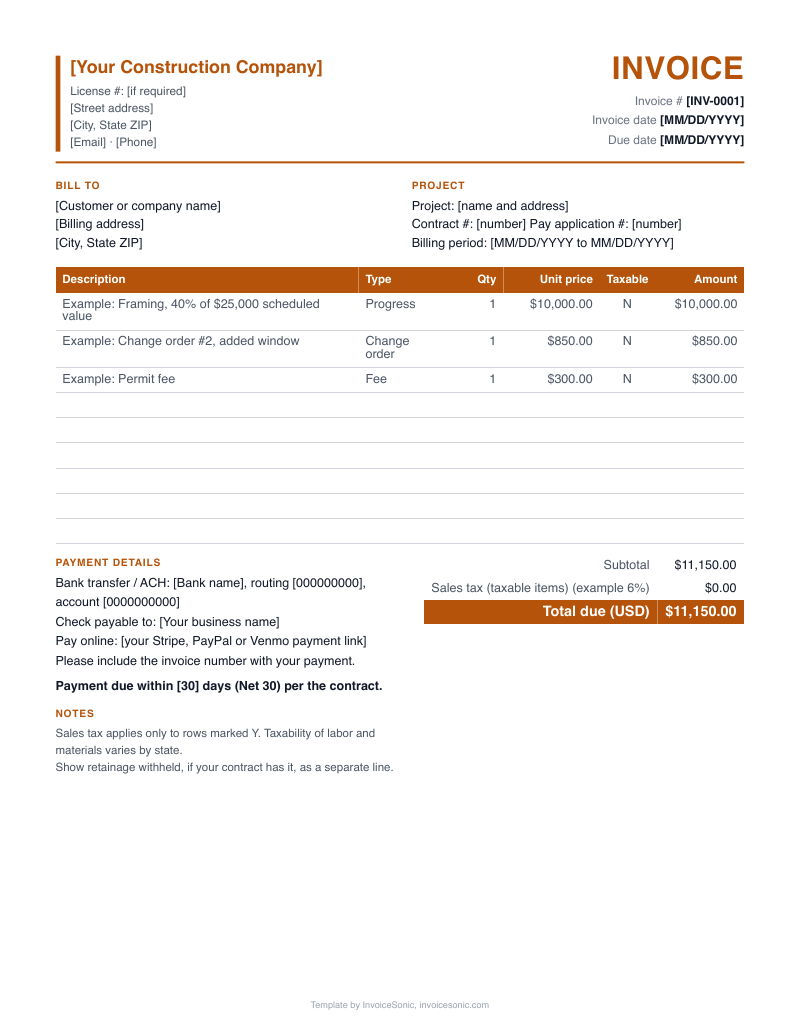
Construction invoice template with the fields a progress bill needs: schedule of values lines, percent complete, retainage and change orders. Edit the sample below or take the file in Word, Excel or PDF. The guide explains what to enter in each field.
Create your invoice online
Download the construction invoice template
US Letter size, with labor, parts and taxable items already laid out. No email needed.
A file gets you one invoice. A free InvoiceSonic account saves your customers and line items for the next one.
What does a progress billing template look like when filled in? (Example with illustrative prices)
A builder sends the first monthly progress invoice on a new shop building. Each line matches a row in the schedule of values and shows only what is billed this period. An approved change order is listed apart from the original contract. The amounts are invented to show the layout and say nothing about real costs.
| Description | Qty | Price | Amount |
|---|---|---|---|
| SOV line 1: Site work, 100% complete, billed this period | 1 | $6,500.00 | $6,500.00 |
| SOV line 2: Foundation, 60% of $30,000 complete, billed this period | 1 | $18,000.00 | $18,000.00 |
| SOV line 3: Framing, 10% of $42,000 complete, billed this period | 1 | $4,200.00 | $4,200.00 |
| Change order #2: added footing drain, complete | 1 | $1,850.00 | $1,850.00 |
| Total due | $30,550.00 | ||
- The total on this example is gross work this period, before retainage.
- If the contract holds 10% retainage, for example, add a line that takes 10% off the gross and show the running retained amount in the notes.
- No sales tax is shown. Tax on construction labor and materials differs by state, so check yours.
Prices are illustrative. Use your own rates.
What should a construction invoice template include?
A construction invoice template should include project and contract details, the billing period, a line for each schedule of values item, percent complete, change orders, retainage and prior payments. Those fields let the owner trace the amount due back to the contract.
- Project block
- Project name, site address, owner, and the general contractor if you are a sub.
- Contract details
- Contract date, number and original contract sum.
- Billing period
- The start and end dates of this draw, plus the application or invoice number.
- Schedule of values lines
- One row per trade or phase, in the same order and with the same wording as the agreed schedule.
- Percent complete
- Work completed to date on each line, then the amount for this period only.
- Stored materials
- A separate column or line, if the contract allows billing for materials delivered but not yet installed.
- Change orders
- Approved changes with their number and amount, plus the revised contract sum.
- Retainage
- The percent held and the running total, which most forms show just above the amount due.
- Balance and terms
- Previous payments, current amount due and due date. Add your license number if your state or customer requires it.
How do you set up progress billing in the template?
To set up progress billing, enter the schedule of values once, then update only the percent complete each period. The template then shows what has been billed to date and what remains on each line.
- Schedule of values
- Split the contract sum across phases so the rows add up exactly to the contract. Agree the split before the first draw, because later invoices depend on it.
- Retainage
- A share of each bill that the owner holds until completion, as a common contract term. Enter the percent the contract sets, and track it as money owed to you.
- Change orders
- Add new rows at the bottom of the schedule instead of changing the original values, so the base contract stays traceable.
- Stored materials
- Keep these apart from installed work. Owners may ask for delivery tickets or proof of insurance before paying them.
How do you fill out a construction invoice template each period?
Fill it out by rolling last period's invoice forward: move this period's billing into the previous column, update percent complete and let the amounts carry. Walk the site before you enter the percentages.
- 1
Copy the last invoice and increase the invoice number and billing period dates.
- 2
Move the prior period's amounts into the previous billings column.
- 3
Update percent complete on each line from the site walk or the superintendent's notes.
- 4
Add any change orders approved since the last invoice.
- 5
Calculate retainage on the amount the contract says it applies to.
- 6
Check that billed plus balance to finish equals the revised contract sum, then export a PDF.
Stop rebuilding this invoice for every job
Create a free account to save your customers and line items, email invoices from your phone or computer, and see what's been paid.
Which template errors delay construction payments?
Most delays come from invoices that do not reconcile to the contract or to the last draw. If the numbers do not tie out, the owner or lender sends the whole package back.
- Billing cumulative totals as this period
- Entering work to date in the current column double bills earlier draws. Keep to-date and this-period amounts in separate columns.
- Rows that do not sum to the contract
- Rounding in the schedule of values leaves a few dollars adrift, and a reviewer will catch it. Fix it on the first draw.
- Losing track of retainage
- Held money that is not on a running tally can be forgotten at closeout. Send a separate invoice for its release when the contract allows it.
- Mixing pending and approved changes
- An unapproved change order in the schedule can get the entire invoice rejected. Track pending items outside the form until they are signed.
- Overstating percent complete
- Billing ahead of the work invites a site check and a cut to your draw. Bill what a walk-through would support.
Construction invoice FAQ
What is a schedule of values on a construction invoice?
It is a breakdown of the contract sum by phase or trade, agreed at the start of the job. Each progress invoice reports against those lines. It gives the owner a way to compare money billed with work in place.
How do I show retainage on the template?
Show the gross amount for the period, then a line for retainage held, then the net due. Keep a running total of everything held to date. The percentage and release terms come from your contract, as retainage is a common practice rather than a fixed rate.
Can I use a simple construction invoice template for small jobs?
Yes. A simple template with labor, materials and a total suits a short job billed once. Use the progress fields when the job runs over several billing periods or the contract calls for draws.
Excel or PDF: which is better for progress billing?
Keep the working copy in Excel, because the formulas carry the running totals from draw to draw. Send the owner a PDF of each period. Save every period's PDF as your record of what was billed.
How do I add a change order to the invoice?
Give it a number that matches the signed change order and list it on its own row. Add its value to the contract sum, then bill it by percent complete like any other line. Leave it off until it is approved.
Does a construction invoice template work for subcontractors?
Yes. Enter the general contractor as the client and use your subcontract amount as the contract sum. Follow any format the GC requires, since many ask subs to match their schedule of values and billing cutoff date.