Free for US businesses · No signup to start · USD and sales tax
Free Contractor Invoice Template for US General and Independent Contractors
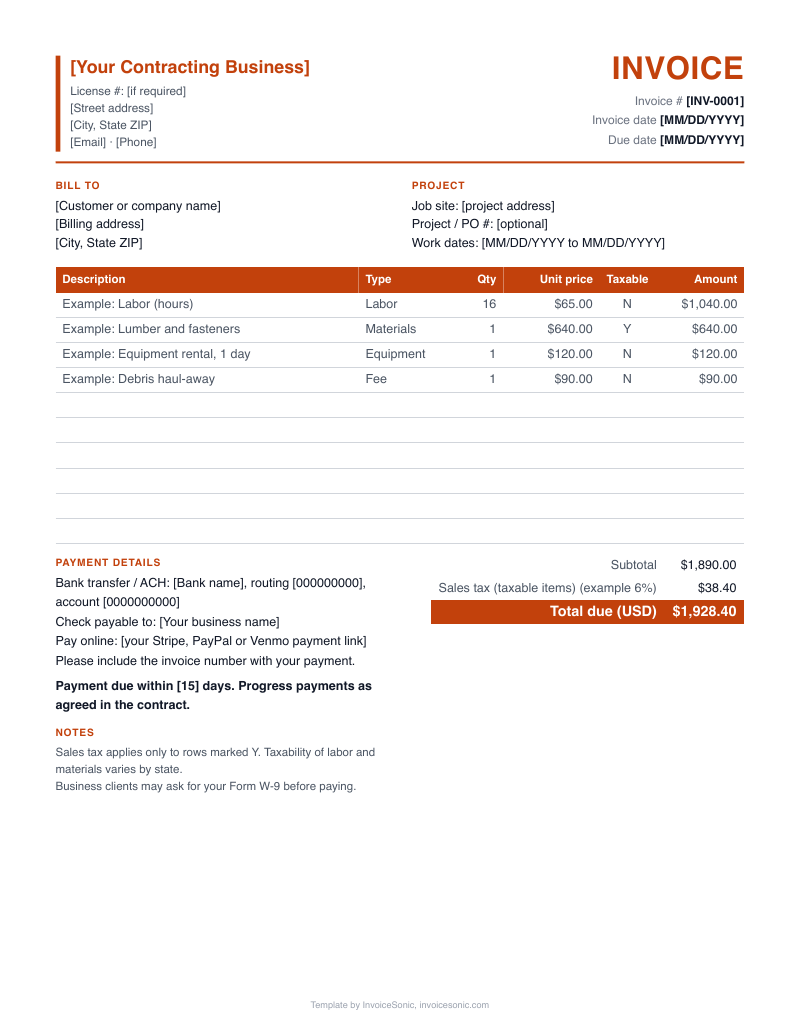
Contractor invoice template, ready to fill in right here. Edit the sample lines below for your job, or take the file in Word, Excel or PDF. The guide after it walks through every field, for a general contractor running a remodel or an independent contractor billing by the day.
Create your invoice online
Download the contractor invoice template
US Letter size, with labor, parts and taxable items already laid out. No email needed.
A file gets you one invoice. A free InvoiceSonic account saves your customers and line items for the next one.
What does a filled-in contractor invoice template look like? (Example with illustrative prices)
A general contractor finishes a hall bathroom remodel for a homeowner and fills in the final invoice. Demolition is a fixed amount, install labor is billed by the hour, materials are a single line backed by receipts, and the one approved change order sits on its own line. All prices are made up to show the layout. They are not market rates.
| Description | Qty | Price | Amount |
|---|---|---|---|
| Demolition and haul-away, hall bathroom | 1 | $1,450.00 | $1,450.00 |
| Tile and fixture install labor (hours) | 46 | $75.00 | $3,450.00 |
| Materials per attached receipts: tile, vanity, fixtures | 1 | $2,860.00 | $2,860.00 |
| Change order #1: add shower niche | 1 | $420.00 | $420.00 |
| Total due | $8,180.00 | ||
- The change order line carries its number, so the homeowner can match it to the signed approval.
- No sales tax appears in this example. Whether your labor or materials are taxed depends on your state, so check before you set the rate.
- If the homeowner paid a deposit, record the date and amount in the notes field and take it off the balance due.
Prices are illustrative. Use your own rates.
What should a contractor invoice template include?
A contractor invoice template should include your business details, the client and job address, an invoice number and dates, itemized labor and materials, and the payment terms. Add fields for the contract reference, change orders and prior payments, so one page shows how the balance was reached.
- Your business block
- Legal business name, address, phone and email. Add your license number if your state or customer requires it.
- Client and job site
- Who pays and where the work happened. These are often two different addresses, so give each its own line.
- Invoice number and dates
- A unique number, the issue date, the due date and the dates the work was done.
- Contract or estimate reference
- The estimate number, contract date or client PO. Commercial clients may reject a bill without their PO.
- Labor lines
- One line per task, showing hours or days and a rate, or a fixed amount for a defined scope.
- Materials lines
- Group small items and list big ones. Keep receipts in the job file in case the client asks.
- Change orders
- A separate line for each approved change, numbered and worded the way the approval was worded.
- Deposits and prior payments
- Each amount already received, with its date, so the balance due is plain.
- Totals and terms
- Subtotal, any sales tax on its own line, total, due date and the ways you accept payment, such as check, ACH, Zelle or card.
How do you set up the template for your type of contract?
Set up the template to match how the contract is priced, because that decides what goes in the line items. A fixed bid needs scope lines, time and materials needs hours and receipts, and milestone jobs need a line for each stage.
- Fixed price
- Use one line per phase with quantity 1. Leave the hours out unless the contract promises them.
- Time and materials
- Use quantity for hours and unit price for your rate, then add materials as separate lines.
- Milestone or draw
- Name the stage on the line, such as rough-in complete, and show the agreed amount for that stage.
- Independent contractor day rate
- Use quantity for days worked and list the date range in the description. Subcontractors billing a general contractor should add the project name and the GC's PO.
How do you fill out a contractor invoice template?
Fill out the template from top to bottom, using your signed estimate and job notes as the source. Save a blank master first, so you never type over a sent invoice.
- 1
Save a blank master with your business details, logo and standard terms, then copy it for each job.
- 2
Enter the client's billing name, the job address and the estimate or PO number.
- 3
Give the invoice the next number in your sequence, then set the issue date and due date.
- 4
Add labor, materials and change orders as separate lines, using your time sheets and receipts.
- 5
Enter any deposit or earlier payment, then check that the balance due is correct.
- 6
Export a PDF so the client cannot change it, and save it under the job name and invoice number.
Stop rebuilding this invoice for every job
Create a free account to save your customers and line items, email invoices from your phone or computer, and see what's been paid.
Which template mistakes cost contractors money?
The costliest template mistakes come from reusing an old file. Stale details, broken totals and missing lines each lead to underbilling or a rejected invoice.
- Typing over last month's invoice
- The old job address or invoice number stays behind, and the client's bookkeeper sends it back.
- Adding rows outside the Excel formula
- New rows may not be in the subtotal, so the total comes out short. Check the formula range after you insert a line.
- Billing an unsigned change
- A verbal change with no reference is the first line a client disputes. Get it approved in writing and cite it.
- A business name that doesn't match your W-9
- Clients often request a W-9 before paying. If the name differs from your invoice, payment can stall while accounts payable sorts it out.
Contractor invoice FAQ
Which format should I use: Word, Excel or PDF?
Use Excel if you want totals calculated for you and have many lines. Use Word if you want to edit the wording and layout. Whichever you edit in, send the client a PDF, because it looks the same on every device and is hard to alter.
Does this template work for independent contractors?
Yes. Put your own name or business name at the top and use the quantity field for hours or days. An independent contractor's invoice usually has fewer lines than a general contractor's, so delete what you don't need.
Can I open a contractor invoice template in Google Sheets?
Yes. Upload the Excel file to Google Drive and open it with Google Sheets. Check that the totals still calculate after the file opens, then download a PDF to send.
How should I number my contractor invoices?
Use a simple sequence that never repeats, such as 1001, 1002, 1003. Some contractors add a job code, like 1001-MAPLE, so every invoice ties to a project. Pick one format and keep it for the year.
Where does a deposit go on the template?
List the deposit below the subtotal or in the notes, with the date it was received, then subtract it from the balance due. Keep the full job value visible. That way the client can see the contract price and what remains.
Should I add my EIN to the invoice?
It isn't always needed on the invoice itself, but some clients ask for it. Many contractors share it through a W-9 instead, since clients often request one before paying. Ask a tax pro what suits your setup.