Free for US businesses · No signup to start · USD and sales tax
Free Mechanic Invoice Template for Independent and Mobile Mechanics
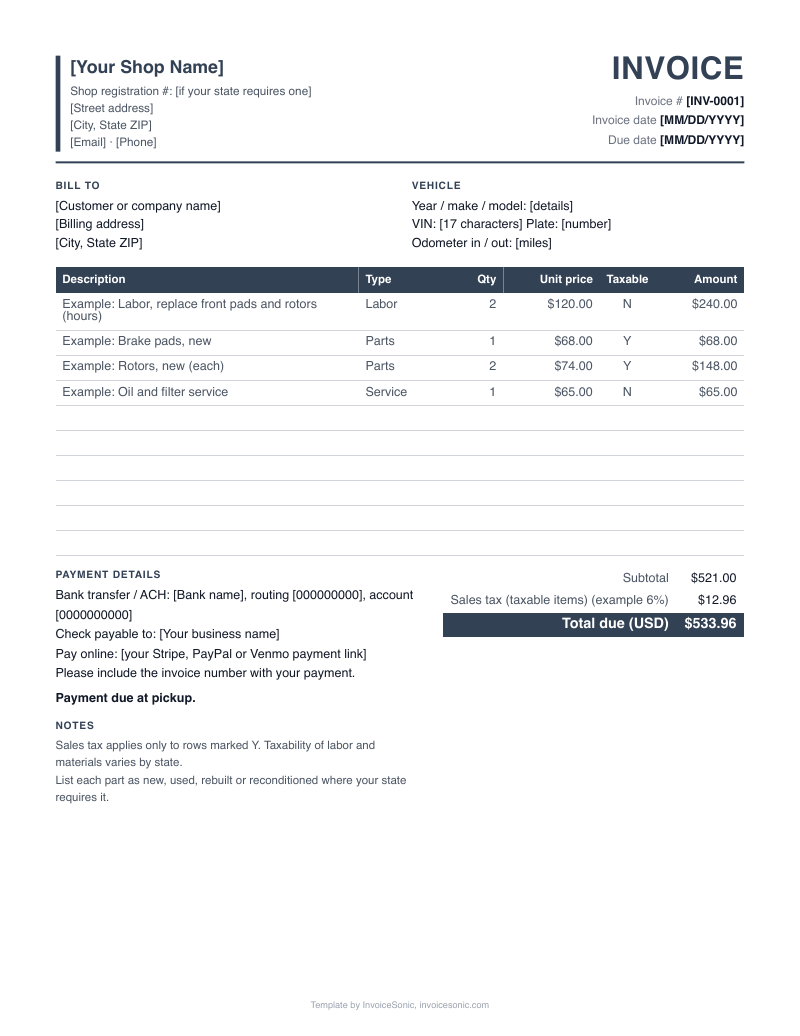
Mechanic invoice template for independent and mobile mechanics, filled in below with a front brake job as the sample. Edit the lines for your own job, then send it from the driveway or the shop. The field-by-field guide shows what goes where.
Create your invoice online
Download the mechanic invoice template
US Letter size, with labor, parts and taxable items already laid out. No email needed.
A file gets you one invoice. A free InvoiceSonic account saves your customers and line items for the next one.
How is a brake job entered on the template? A worked example
Example only, and every price is illustrative. A mobile mechanic replaces the front pads and rotors on a customer's SUV in their driveway. The pads count as one set, the rotors count as two, labor is 1.5 hours, and the trip is billed as a flat service call.
| Description | Qty | Price | Amount |
|---|---|---|---|
| Front brake pads, ceramic, new (set) | 1 | $68.00 | $68.00 |
| Front brake rotors, new | 2 | $74.00 | $148.00 |
| Labor: replace front pads and rotors, road test (hours) | 1.5 | $110.00 | $165.00 |
| Mobile service call | 1 | $45.00 | $45.00 |
| Total due | $426.00 | ||
- Write rotors as quantity 2 at the unit price. A single lump line hides how you reached the figure.
- Use the notes field for what you saw: rear pads at 4 mm, recommend replacing at next service. That turns the invoice into a lead for your next job.
- The tax field shows 0 so you can add your own rate. Tax on parts and labor varies by state, so check yours.
Prices are illustrative. Use your own rates.
What fields does a mechanic invoice template need?
A mechanic invoice template needs fields for you, the customer, the vehicle, the job location, parts, labor, fees and payment. Most fields stay the same from job to job. Only the vehicle, the lines and the notes change.
- From
- Your name or business name, phone and email. Add your license number if your state or customer requires it.
- Bill to
- The person paying, which is not always the driver. A parent or an employer may be the one who pays.
- Invoice no. and date
- Use the date you finished the work. Keep numbers in order so nothing goes missing.
- Vehicle
- Year, make, model and engine, then VIN and plate. A photo of the door jamb sticker gets you the VIN without typos.
- Mileage
- Read it off the dash before you start, and enter the full number.
- Job location
- For mobile work, write the address where the work happened. It backs up your call-out charge and your mileage log.
- Parts table
- One row per part: description, quantity, unit price. Note if the customer supplied the part.
- Labor table
- One row per task, with hours in the quantity column and your rate in the price column.
- Notes and terms
- Recommended follow-up work, your warranty on parts and labor, the due date, and how to pay.
How should an independent mechanic fill in labor and fees?
An independent mechanic should enter labor as hours multiplied by a set rate, in decimals, and keep every fee on its own row. Use the same rate on each job and write 1.5 hours, not 1:30. A consistent format also makes it easy to total a month's labor.
- Hourly labor row
- Quantity is the hours, unit price is your rate. Quarter hours are easy to use: 0.25, 0.5, 0.75.
- Flat-rate job row
- For a job you quote at one price, such as an oil service, set quantity to 1 and describe what the price covers.
- Service call row
- Mobile mechanics can charge a flat trip fee or a rate per mile. Pick one and tell the customer before you drive out.
- Customer-supplied parts
- Write "customer supplied" on a zero-price row. Then state clearly whether your warranty covers that part.
- Parts runs
- If a job needs a trip to the supplier, decide up front whether that time is billable, and say so in your terms.
How do you fill in a mechanic invoice template?
Fill in a mechanic invoice template one block at a time: you, the customer, the vehicle, then parts, labor and fees. Do it at the car, before you pack up. Your part numbers and mileage are all still in front of you.
- 1
Save the file with your name, contact details and hourly rate so they carry over.
- 2
Add the customer's name and phone, plus the job address if you are mobile.
- 3
Enter the vehicle, VIN, plate and current mileage.
- 4
Add a row for each part, using the price from your supplier receipt plus your markup.
- 5
Add labor rows, the service call and any disposal or supplies charge.
- 6
Write your findings and warranty in the notes, add sales tax if it applies, then send it and take payment.
Stop rebuilding this invoice for every job
Create a free account to save your customers and line items, email invoices from your phone or computer, and see what's been paid.
What template mistakes cost a mechanic money?
Mechanics lose the most by billing parts at cost, forgetting small items and leaving warranty terms blank. A filled-in template with fixed rows for these things stops most of it.
- Selling parts at what you paid
- Your time sourcing, collecting and standing behind a part has a cost. Set a markup in advance and apply it on every job.
- Leaving warranty terms blank
- If the notes say nothing, the customer may assume cover you never meant to give. State the length and what it includes.
- No row for the trip
- A mobile job an hour away with no service call line can lose you most of your labor margin.
- Reusing an old file without clearing it
- A leftover VIN or mileage from the last car makes your records wrong. Start each job from a blank master copy.
- Forgetting fluids and small parts
- Brake cleaner, hardware kits and fluid top-ups add up. Add a row for them, or include them in your rate on purpose.
Mechanic invoice FAQ
Do I need a VIN on a mechanic invoice?
It is good practice, because it ties the work to one vehicle even if the plate changes. Some states set specific rules for repair invoices, so check yours. Taking a photo of the VIN is the fastest way to get it right.
Can I use this template if I am a mobile mechanic?
Yes. Add the job address, keep a service call row and take payment on-site by card, Zelle, Venmo or Cash App. Text the invoice to the customer before you leave, so they have it when they pay.
Should a mechanic charge sales tax on the invoice?
That depends on your state, and on whether the charge is for parts or labor. Whether labor or a service is taxed varies by state. Check your state, and if tax applies, show it on its own line.
How do I write up a job when the customer brings their own parts?
List each part with "customer supplied" and a zero price, then bill your labor as normal. In the notes, say whether your warranty covers labor only. This avoids an argument if the part fails.
Does the same template work for truck repair?
Yes, as long as you add the unit number and any hours reading the customer tracks. Fleet owners usually want a PO number and one invoice per unit. They may also ask for a W-9 before the first payment.
What do I do if the job changes after I quote it?
Stop, tell the customer what you found and get their OK before going on. Keep the original quote number in the notes, then add the new work as extra rows. The invoice can then be read against the estimate.