Free for US businesses · No signup to start · USD and sales tax
Free Handyman Invoice Template for Hourly, Flat Rate and Mixed Jobs
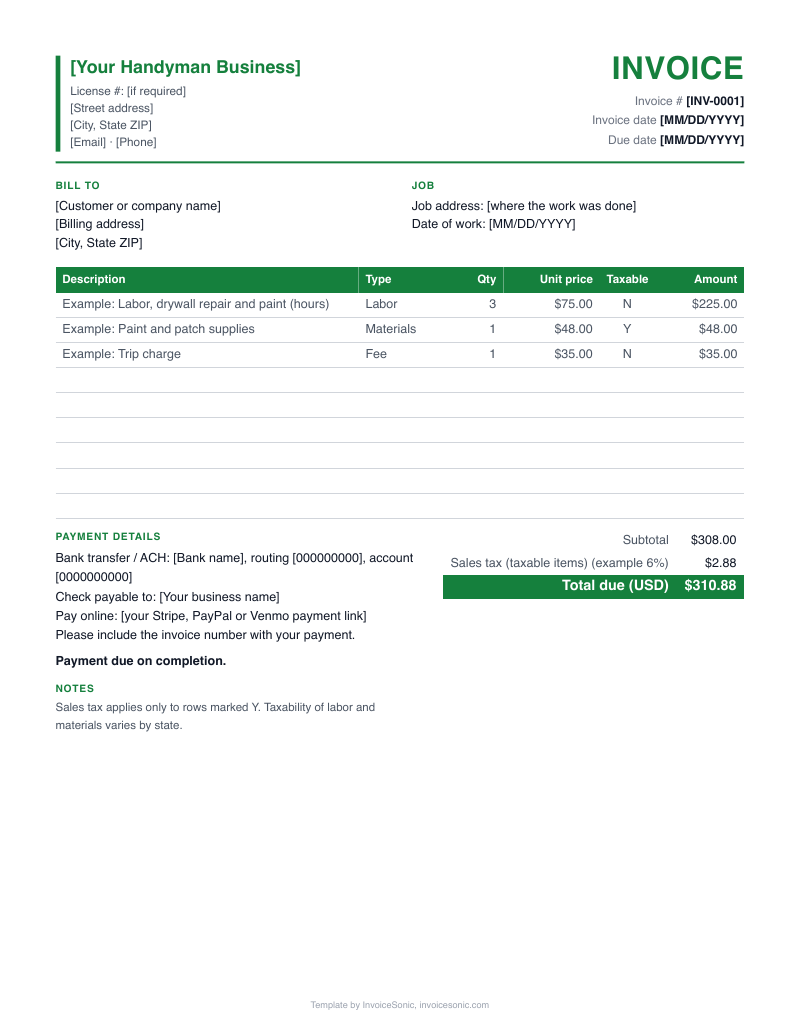
Handyman invoice template, set up for the way a day of repairs really runs: some tasks by the hour, some at a flat price, and parts on top. Change the sample lines below, or take the file in Word, Excel or PDF, and bill the job before you leave the driveway.
Create your invoice online
Download the handyman invoice template
US Letter size, with labor, parts and taxable items already laid out. No email needed.
A file gets you one invoice. A free InvoiceSonic account saves your customers and line items for the next one.
What does a mixed handyman job look like on the template? (Example with illustrative prices)
A handyman spends a morning at one house working through a homeowner's list. The drywall patch runs by the hour because its size was unclear, the fan is a known task at a flat price, and parts and a trip charge are listed separately. These prices are invented for this example. Set your own rates.
| Description | Qty | Price | Amount |
|---|---|---|---|
| Labor: patch drywall and repaint hallway (hours) | 3.5 | $65.00 | $227.50 |
| Flat rate: install customer-supplied ceiling fan | 1 | $145.00 | $145.00 |
| Parts: faucet cartridge, joint compound, paint | 1 | $62.00 | $62.00 |
| Trip charge | 1 | $35.00 | $35.00 |
| Total due | $469.50 | ||
- Hours are in quarter or half hour steps, which a homeowner can check against when you arrived and left.
- The fan description says customer-supplied, so nobody wonders why there is no fan on the parts line.
- This example has no sales tax. Texas, for one, does not tax labor to repair or remodel residential real property, but rules vary by state, so check yours.
Prices are illustrative. Use your own rates.
What should a handyman invoice template include?
A handyman invoice template should include your contact details, the customer and service address, a list of tasks, hours or flat prices, parts, and the payment terms. Because one visit can cover many small repairs, the task list is the field that matters most.
- Your name and business
- Include a phone number the customer will keep, since this invoice doubles as your next lead. Add your license number if your state or customer requires it.
- Customer and service address
- The address matters when you work for landlords or property managers with many units.
- Invoice number and service date
- Use the date of the visit, and list each date if the job took more than one.
- Task list
- Name each repair and its location, such as replace bathroom fan or rehang back gate.
- Hours and hourly rate
- For tasks billed by time, enter hours in quantity and your rate in unit price.
- Flat rate prices
- For a fixed price task, use quantity 1 and show the agreed price.
- Parts and materials
- List anything over a few dollars and note who supplied it.
- Trip or minimum charge
- Keep it on its own line, so it reads as a clear fee and not as padded labor.
- Payment line
- Show the due date and how to pay. Cash, check, Zelle, Venmo and Cash App are common at the end of a visit.
Should a handyman bill hourly or flat rate?
Bill hourly when you can't see the full scope, and flat rate when you know the task well. Most visits mix both, and the template handles this because each line can use its own method.
- Hourly
- Suits repairs with hidden unknowns, such as rot behind a trim board. Write the start and finish times on your job notes.
- Flat rate
- Suits repeat tasks such as mounting a TV or swapping a faucet. If you are quick, you keep the benefit of your speed.
- Mixed job
- Quote the known tasks at flat prices, then run the unclear ones by the hour on the same invoice.
- Parts markup
- Many handymen add a markup to cover the store run, returns and the cash tied up. Either build it into the part price or add a line for handling, and tell the customer up front.
- Minimum charge
- A one-hour or two-hour minimum protects you on small calls. Print the rule in your terms, then apply it the same way each time.
How do you write a handyman invoice using the template?
To write a handyman invoice, list each task with its location, enter hours or a flat price, add parts and any trip charge, and show how to pay. Do it on site if you can, while your receipts and times are in hand.
- 1
Open the template and enter the customer's name, phone and service address.
- 2
Add a line for each task, and say where in the house it was done.
- 3
Enter hours and rate, or quantity 1 and the flat price.
- 4
Add parts from your receipts, including any markup you agreed.
- 5
Add the trip charge and any deposit already paid, then check the total.
- 6
Send the PDF by text or email, or print a copy and hand it over at the door.
Stop rebuilding this invoice for every job
Create a free account to save your customers and line items, email invoices from your phone or computer, and see what's been paid.
What invoice mistakes cost handymen money?
Handymen lose the most money on small things: parts that never reach the invoice, tasks added on the fly and store runs. None looks big alone, but they add up over a year of visits.
- Saying sure to extra tasks
- The add-on during the visit is the task most likely to go unbilled. Add it to the job notes right away, with the customer's okay.
- Unbilled store runs
- A second trip for a part can cost you an hour. Say up front whether travel to the store is billable, then show it as a line.
- Writing only 'repairs'
- A vague line invites a price argument and gives you no record if the customer calls back about warranty work.
- Leaving without payment
- Homeowners pay most easily while they are looking at the finished work. Asking for payment on the day beats chasing a small balance for weeks.
Handyman invoice FAQ
How do I write a handyman invoice?
Start with your details and the customer's. List each task with hours or a flat price, add parts and fees, and finish with the total and how to pay. Keep each line short and specific, so a homeowner can read it in under a minute.
Do I need a business license to send a handyman invoice?
You can write an invoice without special paperwork, but what work you can legally take on depends on your state and city. Check local rules on license needs before you price larger jobs. Add your license number to the template if your state or customer requires it.
Should handymen charge sales tax?
It depends on your state and the work. Whether labor or a service is taxed varies by state, and parts may be treated differently from labor. Check with your state before setting a rate on the template, and show any tax on its own line.
How much should I mark up parts?
There is no standard figure. Choose a markup that covers your time buying, returning and carrying parts, then apply it consistently. Tell customers your policy before the work starts, so the invoice holds no surprises.
Can I use one template for several jobs at one house?
Yes. Put all the tasks from one visit on a single invoice, with a line for each. For a landlord with many units, a separate invoice per unit often makes their bookkeeping easier.
What if a property manager needs a W-9?
Clients often request a W-9 before paying, and property managers commonly do. Keep a signed copy ready to send along with your first invoice. For payments made in 2026, the 1099-NEC threshold rose from $600 to $2,000, so confirm what applies with a tax pro.